
Contract automation uses templates, rules, and workflow to create, route, sign, and track contracts without manual steps. A request form replaces the email to legal, a draft fills itself from the request, approvals route by value and risk, signature and filing happen in one pass, and renewal dates raise their own alerts. Legal writes the rules once, and the system applies them to every contract.
This guide covers what contract automation is, which stages of the lifecycle automate, what to start with, what has to be in place first, and how to pilot it. It is part of our guide to the seven stages of the contract lifecycle and our contract lifecycle management guide.
What is contract automation?
Contract automation is the use of software to carry out repeatable contract steps from rules the organization has already agreed: generating drafts from templates, routing approvals, collecting signatures, filing the signed copy with its data, and alerting owners before dates pass. A contract lifecycle management (CLM) platform is where most of it runs; the automation is the set of rules and workflows configured inside it.
Most legal departments have started. The Blickstein Group’s 18th annual Law Department Operations Survey of 68 companies found that more than 80% have taken steps to establish workflow automation. The difference between programs is what they automate, and in what order.
Which stages of the contract lifecycle can be automated?
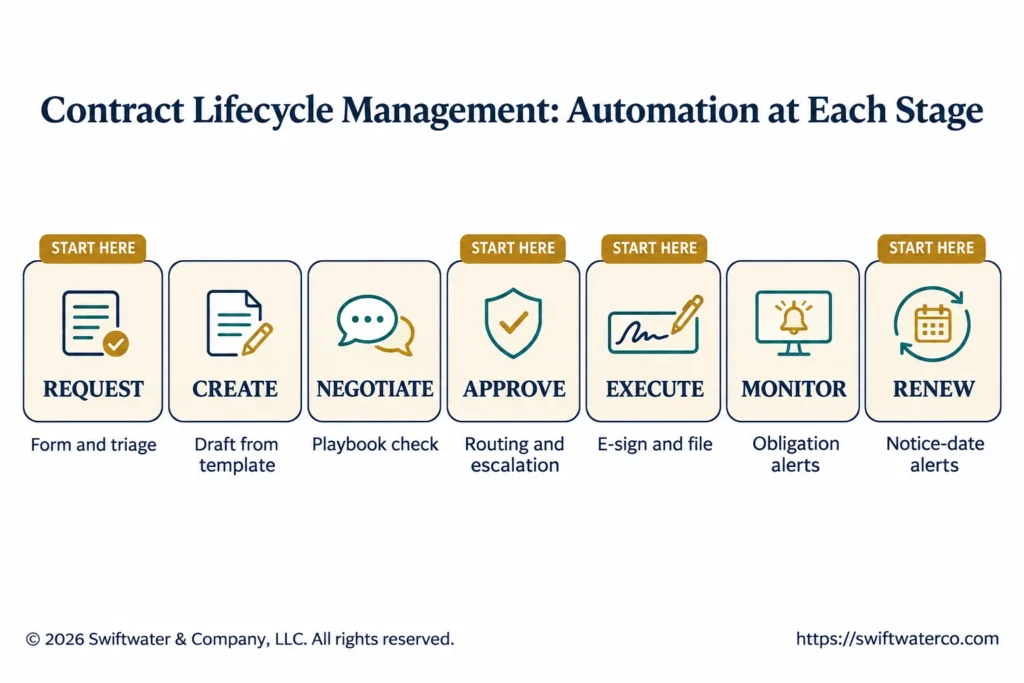
Every stage of the contract lifecycle has steps that can be automated, and the early and late stages automate most easily. Intake, drafting from templates, approval routing, signature, and date alerts follow clear rules. Negotiating nonstandard terms still needs people, though software can check a draft against the playbook first.
| Stage | What automates | Where to start |
|---|---|---|
| Request and intake | Request form, triage, routing to the right owner | Start here |
| Authoring and drafting | Drafts generated from templates and request data | Start here for standard contracts |
| Negotiation and redlining | Playbook checks, AI first-pass review, version tracking | After the playbook is written |
| Review and approval | Routing by type, value, and risk; reminders and escalation | Start here |
| Execution, signature, and storage | E-signature, filing to the repository, data capture | Start here |
| Obligations and performance monitoring | Obligation alerts, evidence requests, reports | After the repository is clean |
| Renewal, renegotiation, or termination | Notice-date alerts, renewal reviews, escalation | Start here |
Each stage has its own guide: contract request and intake, templates, clause libraries, and playbooks, contract workflow management, contract obligation management, and contract renewal management.
What should you automate first?
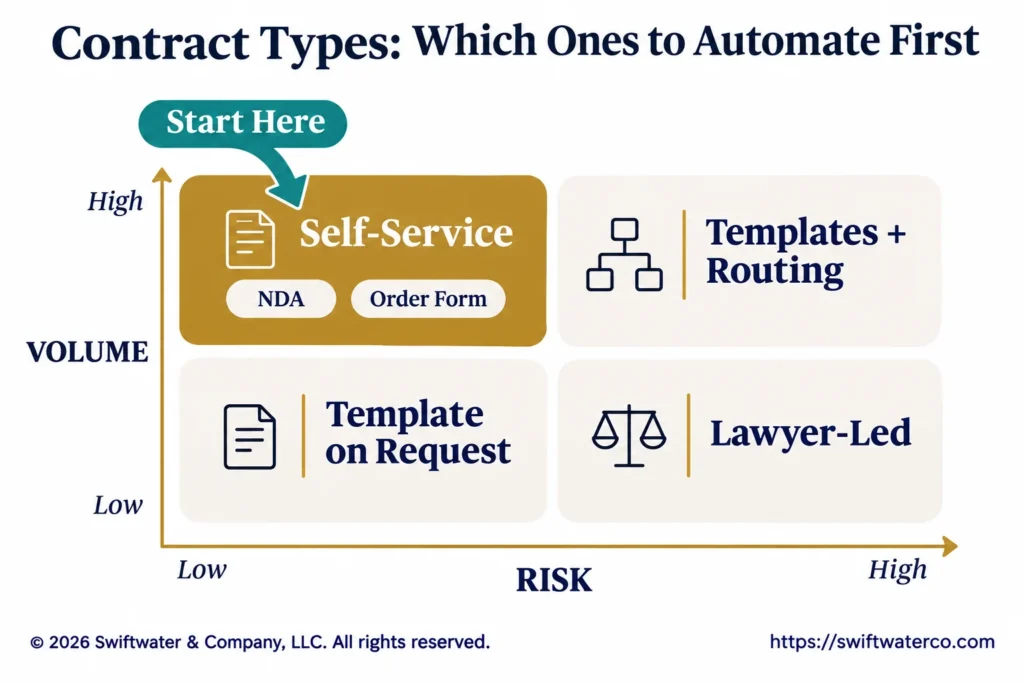
Automate the contracts with high volume, low risk, and standard terms first, because they repeat often enough to pay back quickly and rarely need a lawyer’s judgment. NDAs are the usual starting point, followed by order forms, standard supplier terms, statements of work under an existing master agreement, and renewal alerts across the whole portfolio.
Evaluating or implementing a CLM platform?
We have guided legal departments through selection, implementation, and adoption, without the vendor bias. Let us talk about where you are and what you actually need.
See CLM ServicesA simple test is to sort contract types by volume and by risk:
- High volume, low risk: self-service from templates, with no legal review unless a term changes.
- High volume, moderate risk: templates plus approval routing to the right reviewer.
- Low volume, high risk: lawyers draft and negotiate, supported by the workflow and the repository.
Our guide to automating NDAs walks through the most common first project. For a global retail conglomerate, our professionals replaced a shared legal mailbox with an intake and triage front door, self-service NDAs and influencer agreements, routing the business never had to think about, and service levels, with 100% adoption; the legal intake process article describes it.
What has to be true before automation works?
Automation works only when the rules it applies already exist. Before configuring workflows, a legal department needs approved templates, a playbook with fallback positions, approval thresholds, a named owner for each contract type, and contract data clean enough to trigger alerts. Automating a process that is unclear produces the same confusion faster.
- Templates and a playbook. The approved starting documents and the positions negotiators may accept.
- Approval rules. Who approves what, by contract type, value, and risk.
- Named owners. One owner for each contract type, and someone to run the platform after go-live.
- Clean data. Dates, values, and counterparties held as fields, so alerts and reports work.
Most of the problems a legal department blames on its system turn out to be readiness and business problems. Our guide to CLM readiness and change management covers the groundwork.
What does approval automation look like?
Approval automation routes each contract to the approvers its type, value, and risk require, in the right order, and escalates when a step stalls. Finance sees contracts above its threshold, legal sees deviations from the playbook, and a reminder goes to the approver and then to a backup or manager when a step waits too long.
The routing comes from an approval matrix: a table of contract types, value bands, and risk triggers, each mapped to the approvers it needs. Parallel approvals save time where reviewers do not depend on each other, and every approval is logged on the contract record. Our guide to contract workflow management covers matrix design and escalation rules.
What does AI add to contract automation?
AI extends automation into steps that fixed rules cannot handle: reading the other side’s paper, comparing a draft against the playbook, answering routine questions from the business, and extracting data from signed contracts. Rules still decide what happens next; AI supplies the reading.
Gartner predicts that by 2029, approximately 50% of contract reviews will be delegated to self-service systems that escalate only one in 10 for human review (Gartner, May 2026). That depends on the same groundwork as rules-based automation: a playbook the AI can apply and a route for what it escalates. Our guides to AI contract review and contract intelligence cover the two main uses, and our guide to legal workflow automation covers automation beyond contracts.
How do you pilot contract automation?
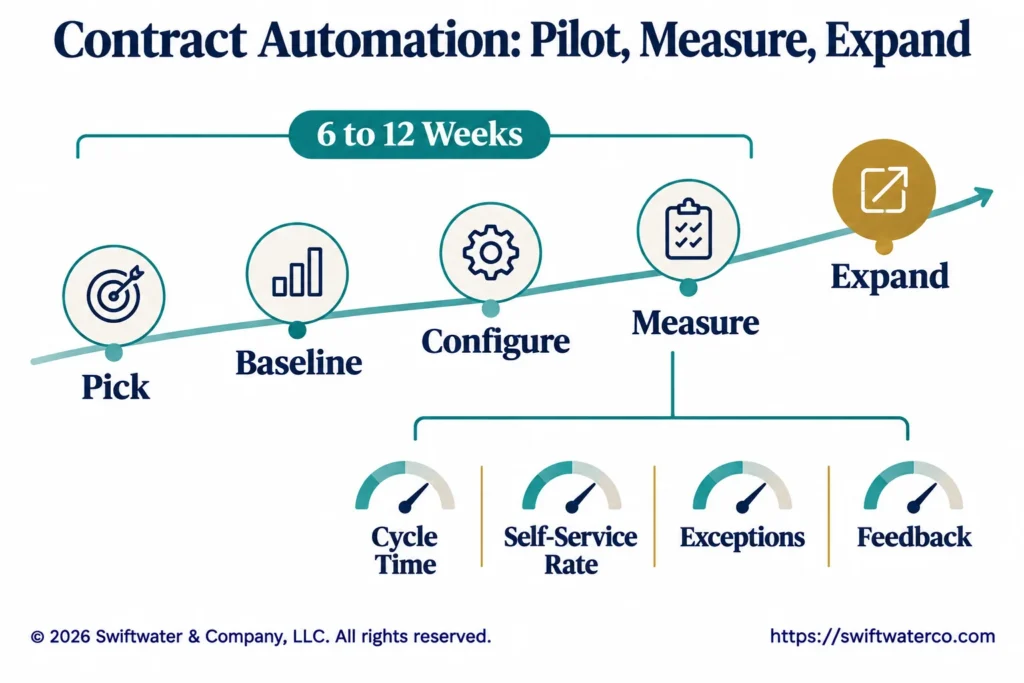
Pilot contract automation on one contract type or one department, measure the results against a baseline, and expand only once it works. A pilot proves the templates, routing, and adoption on real contracts before the rest of the business depends on them. In Swiftwater’s guidance, a pilot on one priority contract workflow typically runs 6 to 12 weeks.
- Pick the workflow. High volume, standard terms, and a business owner who wants it.
- Set the baseline. Current cycle time, request volume, and the share handled by legal.
- Configure and train. Templates, form, routing, and a short guide for users.
- Measure. Cycle time, self-service rate, exceptions reaching legal, and user feedback.
- Expand. The next contract type or department, on the same templates and rules.
Our guide to piloting contract intake covers the same approach for the front door.
What are the pitfalls of contract automation?
The common pitfalls are automating before the rules are agreed, building too many templates, leaving exceptions with no route, and having no one to run the platform after go-live. Each one is a process or ownership gap that shows up as a technology problem.
- Rules not agreed. Templates and approval thresholds still under debate when the workflow is built.
- Template sprawl. A template for every variation, so users cannot find the right one and legal cannot maintain them.
- No exception route. Requests that do not fit the form go back to email.
- No owner after go-live. Templates age, users leave, and the workflow stops matching the business.
- Measuring activity only. Counting contracts processed instead of cycle time, self-service rate, and exceptions.
Bottom Line
Contract automation turns rules the legal team has already agreed into steps the system runs on every contract: intake, drafting from templates, approval routing, signature and filing, and alerts on dates and obligations. It pays back fastest on high-volume, standard contracts such as NDAs and order forms, and it depends on templates, a playbook, approval rules, and owners being in place first.
Start with one workflow, measure it against a baseline, and expand on the same rules, with someone named to run the platform after go-live. Automate the high-volume, standard contracts first, on templates and rules that already work, and let legal spend its time on the exceptions.
Evaluating legal technology but not sure where to start?
We help legal departments cut through the vendor noise, mapping technology to process maturity and building a roadmap that actually gets adopted.
See Legal TechnologyOur contract management solutions help legal, procurement, and sales teams decide what to automate first, configure the templates and workflows in the CLM, and run the platform after go-live.
Frequently Asked Questions
What is contract automation?
Contract automation uses templates, rules, and workflow to create, route, sign, and track contracts without manual steps. It covers request intake, drafting from templates, approval routing, e-signature and filing, and alerts on renewal dates and obligations. A CLM platform usually runs it, with legal setting the rules.
What contract tasks can be automated?
Intake and triage, drafting from approved templates, approval routing and reminders, e-signature, filing with metadata, and alerts for renewals and obligations can all be automated. Negotiating nonstandard terms and deciding exceptions still need people, though AI can do a first-pass review against the playbook.
Can you automate contract creation with CLM software?
Yes. A CLM generates a draft from an approved template using the data captured in the request, such as counterparty, value, and term, and selects clauses by rule. Standard contracts can then be self-service, with anything outside the template routed to legal.
Can you pilot contract automation in one department before expanding?
Yes, and it is the recommended way to start. Pick one high-volume workflow, such as NDAs in one business unit, set a baseline, run it for 6 to 12 weeks, and measure cycle time, self-service rate, and exceptions before expanding on the same templates and rules.
Can a CLM automatically escalate stalled approvals?
Yes. Approval workflows can send reminders after a set time and escalate to a backup approver or the approver’s manager when a step stalls. Set the timings by contract type and value, and review the approvals that escalate most often, since they usually point to a routing rule that needs fixing.
What is the difference between contract automation and CLM?
A CLM is the platform that manages contracts across the lifecycle; contract automation is the set of rules and workflows that run inside it. A company can own a CLM and automate very little, and some automation, such as e-signature or document generation, can run in standalone tools.
This article is provided for general informational purposes only and is not legal, financial, or business advice. Contract automation decisions should be validated against your organization’s specific structure, regulatory obligations, and counsel guidance, and you should consult a qualified professional for advice on your situation.