


Legal workflow automation involves using technology to automate the repetitive, manual tasks that bog down a legal practice. It’s the shift from a chaotic, do-it-as-it-comes approach to a standardized and systematic operation. This allows legal professionals to stop wrestling with administrative burdens and start focusing on the high-value work that truly matters.
Law firms and in-house legal departments automate many of the same workflows, and each side’s automation shapes the other’s experience. This guide covers how in-house departments apply automation, the core components, how AI extends them, a four-phase implementation roadmap, and how to measure ROI, with notes throughout on what firm-side automation means for corporate clients and what in-house automation means for the firms that serve them. It is part of our legal operations insights hub.
In brief
If you work at a law firm: automation pays off fastest on intake, document assembly, deadline tracking, and billing (see the core components). Your corporate clients increasingly measure firms on clean invoices, proactive status updates, and matter data that fits their systems (where firm and client workflows meet). The ROI section shows how to put a dollar figure on the time recovered (measure your ROI).
If you lead an in-house legal department: start with intake, contract routing, and matter and spend workflows (what in-house teams automate first). Use the law-firm sections to understand how your outside counsel work and what to ask them (questions for your firms). The illustrative NDA example shows how to build the department’s business case (in-house ROI example).
Throughout, paragraphs marked For in-house readers and For law firm readers connect the two views.
What Is Legal Workflow Automation Anyway?
Legal workflow automation is about creating a predictable “recipe” for your firm’s routine procedures. We all have them: multi-step processes we handle daily, like client intake, document drafting, or even billing. Automation software takes these repeatable workflows and essentially puts them on autopilot, driving consistency and significantly reducing the risk of human error.
The point is to empower lawyers. Think of it like swapping a messy home kitchen for the streamlined efficiency of a five-star restaurant. Instead of a paralegal spending an hour copying and pasting client data into a dozen different forms, an automated system can populate everything in seconds. Instead of someone manually tracking deadlines on a shared calendar, an automated workflow can fire off reminders and escalate tasks when they’re overdue. It’s a smarter way to work.
From Manual Chaos to Automated Clarity
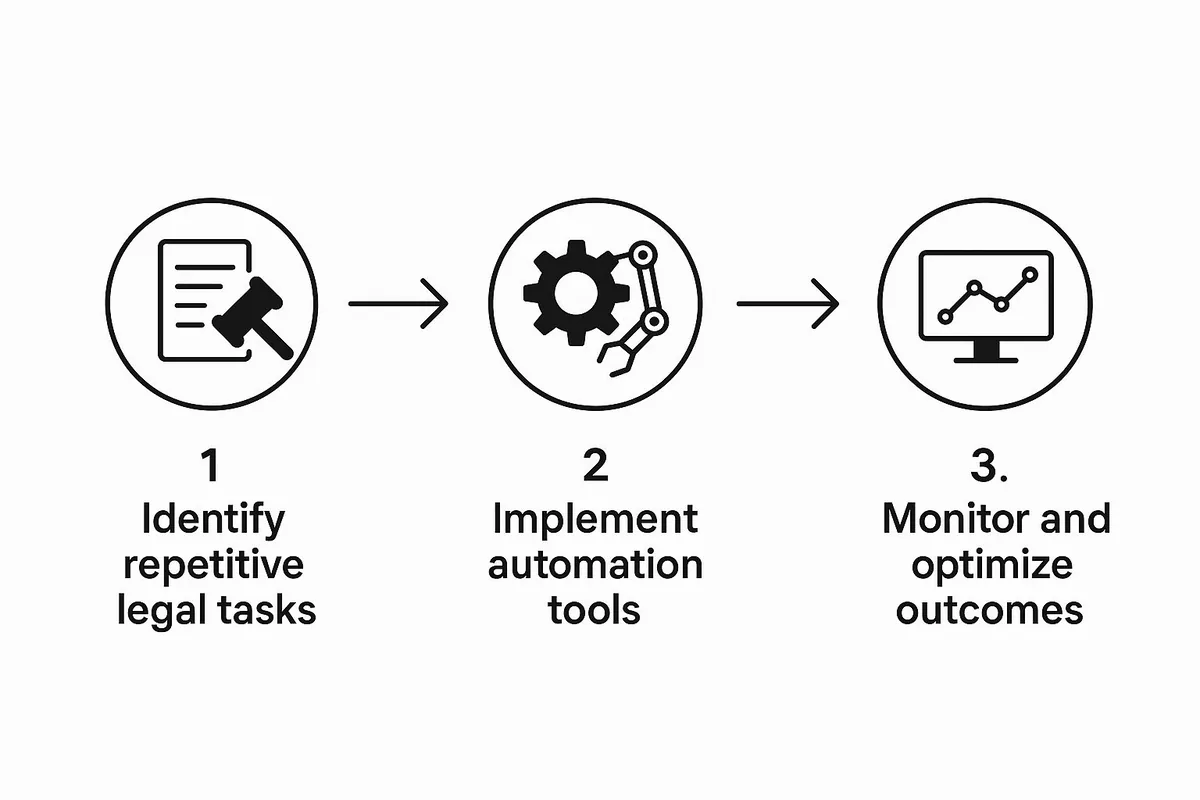
To get a handle on legal workflow automation, start with the core principles and apply them directly to legal functions. The result is a clear “before and after” picture of your operations.
The process flow below breaks down the three foundational steps to making this transformation happen.
Building the legal operations function from scratch?
Assessment, roadmap, and delivery for the operational side of the department: spend, technology, process, vendors, and the data that proves what legal delivers. Advice from operators who ran the function.
See Legal Ops ConsultingAs you can see, it’s a cycle: you spot the bottlenecks, apply the right technology to fix them, and then refine the results to keep improving. The market is growing fast. Precedence Research values the global market for robotic process automation in legal services at USD 2.69 billion in 2024 and projects it to reach USD 13.09 billion by 2034.
The practical difference becomes undeniable when you put common tasks side by side.
By standardizing processes through automation, law firms can eliminate guesswork and ensure every client receives the same high level of service, every single time. It’s about building a system for excellence.
Let’s take a look at how daily activities fundamentally change when you introduce a smart, automated system. The table below shows the improvements in time, operational quality, and client service.
A Quick Look at Manual vs. Automated Legal Tasks
This table contrasts traditional manual methods with automated workflows for common legal processes, highlighting key improvements in efficiency, accuracy, and time.
| Legal Task | The Traditional Manual Way | The Modern Automated Way |
|---|---|---|
| Client Intake | Staff manually enters client data from a paper or PDF form into multiple systems (CRM, billing, case management). Prone to typos and takes significant time. | A client fills out one online form. The data is automatically pushed to all connected systems instantly and without errors. |
| Document Assembly | Paralegals or associates copy and paste information into document templates, a tedious and error-prone process. Version control is a nightmare. | Software automatically generates complex documents (e.g., NDAs, engagement letters) by pulling data from the client’s file. Always uses the latest approved template. |
| Deadline & Task Tracking | Relies on manual calendar entries, personal reminders, and emails. It’s easy to miss critical dates, leading to significant risk. | The system automatically calculates deadlines based on case triggers, assigns tasks to team members, and sends escalating reminders until work is completed. |
| Billing & Invoicing | Lawyers manually track billable hours, which are then compiled and entered into invoices by administrative staff. This often results in lost billable time and invoicing delays. | Time is automatically tracked or tracked with a single click. Invoices are generated and sent to clients on a pre-set schedule without manual intervention. |
Seeing the comparison makes it clear. Moving to automation is a fundamental change in how a modern law firm operates, freeing up your most valuable resource, your people, to focus on practicing law.
Legal Workflow Automation for In-House Legal Departments
Corporate legal departments use the same building blocks. For in-house teams, the pressure comes from volume: in the 2025 CLOC State of the Industry Report, 83% of legal departments expected demand to increase and 63% named workload and resource bandwidth as their top challenge. Workflow automation is how legal operations teams absorb that demand without adding headcount.
The workflows in-house teams automate first tend to be:
- Intake and legal service requests: a single front door that captures requests from the business, routes them to the right lawyer, and tracks turnaround. See how to automate legal service requests to modernize your department.
- Contract approvals and routing: standard agreements move through pre-set approval paths, with escalations when a deadline slips. Our guide to contract workflow management covers the process end to end.
- Matter and spend workflows: matters, budgets, and outside counsel invoices follow structured review and approval steps inside an enterprise legal management platform.
- Low-code workflow building: platforms such as Onit Apptitude let legal operations teams build and adjust workflows quickly, without waiting months for development cycles.
The four-phase roadmap later in this guide applies to departments too: start with the bottleneck that hurts most, run a pilot, then scale and measure. Our legal technology services cover intake, workflow automation, and enterprise legal management implementation for in-house teams.
What In-House Automation Means for Law Firms
When a legal department automates, its expectations of outside counsel change. Matter intake and approvals start in the department’s system, so firms receive cleaner, more structured instructions. eBilling platforms check every invoice against billing guidelines before it reaches a reviewer, so non-compliant time entries come back fast. And the department now has data on cycle times, budgets, and invoice accuracy for every firm on its panel.
For law firm readers: the firms that fare best mirror that discipline, with automated time capture that follows client billing guidelines, budgets and status updates delivered without a chase, and matter data that drops cleanly into the client’s system. For in-house readers: sharing your workflows and guidelines with firms up front, and asking how they will meet them, turns automation on both sides into a better working relationship. Our outside counsel management guide covers how departments build that relationship.
Exploring the Core Components of Automation
So, what’s really going on behind the scenes with legal workflow automation? Think of it like a high-performance engine: a whole system of components firing in sync. To get a real sense of the impact, we need to pop the hood and examine the individual components that replace manual bottlenecks with automated precision.
Each of these components is designed to address a specific, often frustrating, part of the daily grind in a law firm. When you connect them, you build a complete ecosystem that handles information, tasks, and communication from the moment a client walks in the door to the final case resolution.
Let’s break down these essential building blocks.
Need the function run, not just advised on?
Swiftwater embeds senior practitioners directly into legal operations, handling bill review, matter management, and program delivery on your behalf.
See Managed Services
Document Automation and Assembly
This is often the first, and most noticeable, win for firms. Document automation tools work like an expert paralegal who never gets tired and never makes a typo. They use your firm’s pre-approved templates and smart, conditional logic to churn out complex, flawless documents in seconds.
- The Bottleneck It Solves: Manually drafting contracts, engagement letters, or court filings by copying and pasting client info is a recipe for tedium and mistakes. A single error, such as a wrong name or a misplaced date, can have serious consequences down the line.
- Real-World Example: Your firm needs to generate ten non-disclosure agreements (NDAs) for a new corporate client. Instead of a junior associate spending half a day on it, the system pulls data for all 10 parties and generates personalized, perfect NDAs with a single click.
Intelligent Client Intake Forms
You only get one chance to make a first impression. Intelligent intake forms turn the clunky, paper-shuffling of client onboarding into a smooth, guided digital experience. These are dynamic tools that adapt based on a client’s answers.
For instance, if a potential client says they’re dealing with a business dispute, the form can instantly ask follow-up questions specific to corporate litigation. A client with a real estate matter would see a completely different set of questions. This ensures you get all the critical information upfront, correctly, and without any back-and-forth.
By automating intake, you not only slash administrative labor but also start every single case with a complete and accurate data foundation. This initial data becomes the fuel for every other automated workflow that follows.
Task and Deadline Management
A law firm’s entire world revolves around deadlines. Missing one can be catastrophic. An automated task management system is like your firm’s air traffic controller, making sure no flight is missed and nothing collides.
The moment a new matter is opened, the system can automatically create a checklist of standard tasks, assign them to the right people, and set deadlines based on jurisdictional rules or your firm’s own protocols. It sends reminders, escalates overdue items, and provides a clear dashboard view of who’s doing what.
Connecting the Ecosystem
While each of these pieces is powerful on its own, the real value of legal workflow automation comes when you link them all together. This integration creates a single source of truth for every bit of case-related information and activity. Here are a few other key components that tie it all together:
- E-Signatures: Securely send documents for signature and automatically file the executed copies in the client’s matter. No printers, no scanners, no hassle.
- Secure Client Portals: Give your clients a safe, online space to upload documents, communicate with their legal team, and check case status. This cuts down on the endless “just checking in” emails and phone calls.
- Crucial Integrations: The platform’s ability to connect with your other essential software, like your billing system, email, or cloud storage, is critical. This free flow of data eliminates duplicate entry and creates a unified, seamless tech stack.
Combined, these elements give your entire firm a reliable, scalable operational foundation.
Where Law Firm and In-House Workflows Meet
Several of these components do not stop at the firm’s walls. A firm’s time capture and invoicing feed its corporate clients’ eBilling systems, where invoices are checked against billing guidelines, often at the point of submission. Intake data a firm collects becomes the matter record its client tracks. Client portals and automated status updates replace the email chains in-house teams spend hours chasing.
For in-house readers: these are useful questions for your outside counsel. Do they use document automation for routine drafting, and does that show up in fees or turnaround? Can their billing systems produce invoices that pass your billing guidelines the first time? Can they give you matter status without a round of emails? Our guide to how legal eBilling works explains what happens to an invoice once it reaches your system.
For law firm readers: clean, automated handoffs are part of the service. Invoices that clear a client’s billing guidelines without rejection, and status updates that arrive before they are requested, make a firm noticeably easier to work with.
How AI Is Elevating Legal Automation
If standard legal workflow automation is like a skilled assistant diligently following a checklist, then adding Artificial Intelligence (AI) is like giving that assistant a law degree and a strategic mind. Beyond executing preset rules, AI learns, analyzes, and can even start to predict outcomes.
This evolution is turning legal automation from a simple tool for speed into a genuine partner for strategy. It makes your processes smarter as well as faster.
Beyond Rules to True Intelligence
Think of traditional automation in terms of simple “if-then” logic. If a client signs an engagement letter, then the system sends a welcome email. It’s useful, but limited.
AI operates on a much deeper level. It uses machine learning and natural language processing to understand context, spot patterns, and draw conclusions from massive amounts of unstructured data, the kind of messy, real-world information found in contracts, emails, and case law.
Evaluating legal technology but not sure where to start?
We help legal departments cut through the vendor noise, mapping technology to process maturity and building a roadmap that actually gets adopted.
See Legal TechnologyFor example, an AI-powered document review tool can tear through thousands of discovery documents in minutes. It goes beyond keywords to understand concepts and clauses, flagging potential risks or identifying crucial evidence that a human team might take days to find. That is a strategic advantage as well as an efficiency gain.
Adoption is accelerating. In the 8am 2026 Legal Industry Report, a survey of more than 1,300 legal professionals, 69% said they use generative AI tools for work, up from 31% the year before. In-house teams are moving too: the 2025 CLOC State of the Industry Report found 30% of legal departments already using AI and 54% planning to adopt it within two years.
AI-Powered Applications in Practice
The practical ways AI is being used in legal work are growing fast, delivering real value in a few key areas. Firms are actively using them to get better results.
- Predictive Analytics: By sifting through historical case data, AI models can forecast potential case outcomes, estimate litigation costs, and even suggest settlement ranges. This data-driven insight helps lawyers and clients make smarter strategic calls on whether to push for trial or settle.
- Intelligent Legal Research: AI-powered research platforms go way beyond basic keyword searches. They can analyze a case brief and instantly pull the most relevant statutes and precedents, sometimes even uncovering obscure arguments that could be a game-changer for a case.
- Contract Analysis and Management: AI can scan contracts and automatically flag non-standard clauses, potential risks, and missing provisions. It compares new agreements against a firm’s established playbook, helping ensure compliance and dramatically reducing negotiation time.
AI empowers legal professionals to shift their focus from sifting through mountains of data to interpreting the critical insights that the technology uncovers. It augments human expertise, allowing lawyers to operate at a higher strategic level.
Making AI Accessible to Your Firm
The good news is, you don’t need a team of data scientists on staff to bring AI into your firm. As the technology matures, platforms are emerging that allow people without a coding background to build intelligent applications.
Most firms have chosen to experience AI through embracing AI research tools and co-pilots.
For firms looking to try AI without a massive upfront investment, no-code AI app builders are a practical entry point.
The traditional AI and app builders that still capture the broader market share are the likes of Microsoft Power Apps, IntApp, Nintex, and so on.
Enterprise systems such as Salesforce and ServiceNow also have dedicated booths at legal conferences to demonstrate their app-building and workflow orchestration abilities.
Then there is a specialized breed of legal industry-specific software, such as Docminder & Onit, and tools, such as document management systems, that offer extended workflow automation capabilities, such as Netdocuments NDMax AI.
This accessibility is leveling the playing field, allowing even smaller firms to deploy sophisticated legal workflow automation. Instead of a huge, risky project, you can start small. Build a custom AI-powered workflow for a specific need, like automated risk scoring for new clients or intelligent document routing – and build from there. It’s a much more agile and cost-effective way to adopt this next generation of automation.
The Real-World Benefits of Automating Your Firm
Understanding the nuts and bolts of legal workflow automation is one thing. But what really matters is seeing how it translates into tangible results for your firm. When we move past the how and focus on the why, we start to see the profound impact automation can have on your firm’s overall health and performance.
The benefits go well beyond convenience: a more profitable, reliable, and client-focused practice. These advantages really fall into three core pillars: direct financial gains, improved operational control, and elevated client relationships. Each one builds on the last, creating a powerful cycle of improvement that touches every part of your business.
Let’s unpack the concrete results you can expect when you bring automation into your legal workflows.
Fortifying Your Financial Foundation
The most immediate and measurable benefit of automation is a boost to your firm’s bottom line. By taking over the repetitive, non-billable admin work, automation directly plugs financial leaks and opens new revenue avenues. It also changes how your firm generates revenue.
Think about all the time your team spends on tasks like manual data entry, document formatting, or chasing people with reminder emails. An automation system can knock out these duties in a fraction of the time, freeing up your skilled legal professionals to focus on what only they can do: high-value, billable work.
With your corporate clients under similar pressure to achieve savings, those that you achieve in-house can be passed on financially, competitively or otherwise to the client. Offering any improvement in cost, speed, or quality will help you differentiate your services from your peers.
As a result, you can handle a much greater volume of casework without having to proportionally increase your headcount. That efficiency gain is a direct line to higher profitability.
Clio’s 2025 Legal Trends Report found that growing law firms are 2x more likely to leverage automation than stable firms. Automation reclaims hours lost to administrative tasks and converts them back into revenue-generating activity.
For in-house readers: when a firm automates routine work, it is fair to ask how the savings reach you, whether through fixed fees for standard documents, fewer hours billed for assembly, or faster turnaround. Inside the department, the same automation lets lawyers handle routine matters in-house that might otherwise go to outside counsel, which is where the budget impact shows up.
Achieving Operational Mastery
Beyond the financial upside, automation brings a whole new level of precision and consistency to your firm’s day-to-day operations. It acts as a powerful defense against human error, which we all know can be costly, both in dollars and reputation. When you standardize your processes, you ensure that every task is performed correctly, every single time.
Efficiency and effectiveness achieved through systematic automation should be reviewed with your corporate legal clients. They have internal legal operations teams working to save costs and boost efficiency.
Imagine the risk of a manually drafted contract containing a simple typo or an incorrect date. Automation virtually eliminates these kinds of slip-ups by populating documents from a single, verified source of truth.
This operational discipline extends to compliance as well. Automated workflows ensure every required step in a process is completed and documented, simplifying audits and reducing regulatory risk.
Here’s how automation reinforces your control over operations:
- Standardized Quality: It guarantees every client receives the same high-quality service because processes are locked into a pre-defined, best-practice workflow.
- Error Reduction: It minimizes the kinds of mistakes in documents, filings, and communications that come from manual data entry or simple oversight.
- Simplified Compliance: It creates an automatic audit trail, making it much easier to prove that proper procedures were followed.
Legal departments get the same standardization benefits internally: consistent handling of requests from the business, complete approval records, and cleaner data for reporting to the general counsel. For law firm readers: that data increasingly includes how outside counsel perform. Departments that track cycle times, budget accuracy, and invoice compliance use those numbers in panel reviews, so a firm’s own automation shows up directly in how its clients manage outside counsel.
The shift is happening across professional services. The Thomson Reuters Institute 2026 AI in Professional Services Report, based on more than 1,500 respondents in 27 countries, found organization-wide AI usage almost doubled to 40% in 2026 from 22% in 2025.
Building Superior Client Relationships
All the financial and operational improvements should lead to one critical outcome: happier clients. In a crowded market, client experience is a massive differentiator. Automation lays the groundwork for delivering a service that is excellent, fast, transparent, and responsive.
When your workflows are automated, everything just moves faster. Engagement letters go out instantly. Client questions get routed to the right person without delay. Case milestones are updated automatically. This speed and efficiency directly translate into a better client experience, showing them that your firm is organized and respects their time.
To learn how your clients are using automation, you can review how to automate legal service requests to modernize your department and drastically improve turnaround times.
Faster responses, greater transparency into case progress, and quicker results are what build lasting client loyalty. This leads to better online reviews, more word-of-mouth referrals, and a stronger reputation, the most valuable assets any firm can have.
For an in-house team, the client is the business, and the same rules apply: faster answers, visible progress, and predictable turnaround build trust with sales, procurement, and HR. For law firm readers: in-house teams that have automated their own intake and reporting often expect their firms to plug into it, with budgets, status updates, and matter data delivered in the format their systems use. For in-house readers: the firms that make that easy are usually the ones that have automated their own workflows first.
A Practical Roadmap to Implementing Automation
Ready to move from theory to action?
Implementing legal workflow automation can feel like a massive project, but breaking it down into a clear, manageable roadmap makes all the difference. Forget the idea of a disruptive, firm-wide overhaul. Instead, think of it as a series of deliberate, strategic steps that build on each other.
This approach lets you score some quick wins, prove the value of automation early on, and build real momentum for wider adoption. The goal is a successful, sustainable transition. Here’s a practical, four-phase plan I’ve seen work time and time again.
Phase 1: Pinpoint Your Biggest Bottlenecks
You can’t fix a problem until you know exactly where it is. The first step is to take a hard look at your current processes. You can’t automate everything at once, so focus on identifying the areas causing the most friction, delays, or downright errors.
Look for high-volume, repetitive tasks that eat up significant non-billable hours. The usual suspects? Things like client intake, assembling standard agreements, and manually tracking deadlines. A great way to start is by mapping out a specific workflow from beginning to end. Note every single touchpoint and handoff. This visual exercise will immediately highlight the most inefficient steps.
To do this right, you have to involve the people in the trenches: your paralegals, legal assistants, and associates. They have firsthand knowledge of the real pain points. This also builds buy-in from the get-go, making them part of the solution instead of feeling like a solution is being forced on them.
In a legal department, the same mapping exercise usually starts with intake and contract requests from the business, and it should include the handoffs to outside counsel, where many delays hide.
Hire external advisors like Swiftwater & Company that work on both sides of the fence. Consultants who solve law department problems bring a unique view of the challenges clients face when working with firms and what can be done to alleviate them. Even if you cannot solve those challenges immediately, you gain insight into what a world-class client experience (CX) looks like.
Phase 2: Choose the Right Tools
Once you know what to fix, you need the right tools for the job. The legal tech market is booming, but not all solutions are created equal. Your choice must be grounded in your firm’s specific needs, size, and technical realities.
As you evaluate software, keep these factors in mind:
- Ease of Use: Can your team actually use it without months of training? A complicated tool that nobody touches is just a wasted investment.
- Integration Capabilities: Does it integrate well with the other software you already rely on, such as your billing system or document management platform? Seamless integration is what creates a truly unified workflow.
- Security and Compliance: Does the provider meet industry standards and comply with data security and privacy regulations? This is absolutely non-negotiable.
- Scalability: Will the tool grow with your firm? You need a solution that can handle your needs today and in five years.
This decision obviously has a financial component. The legal AI market was valued at USD 1.9 billion in 2024 and is set for steady growth. But high upfront costs for licensing and integration can be a real hurdle, especially for smaller teams. This makes finding a scalable, cost-effective tool absolutely vital. Discover more insights about the legal AI market on gminsights.com.
The best automation tool is the one that solves your biggest problem effectively and is actually embraced by your team, whatever its feature list.
Phase 3: Launch a Pilot Project
Instead of a massive, firm-wide rollout, start with a limited-scope pilot project. Focus on one of the bottlenecks you identified back in Phase 1. This whole strategy is about securing a quick, measurable win.
For example, you could automate the generation of engagement letters or streamline the client intake process for a single practice area. A successful pilot does two critical things: it gives you tangible proof of concept and starts building enthusiasm and confidence across the team. When you document the results – like hours saved or errors eliminated – you create a powerful case study for getting more investment and buy-in down the road.
An in-house team might pilot automated NDA requests for a single business unit, or a firm might pilot automated matter status updates for one key client, a pilot that doubles as a client-service conversation.
Phase 4: Scale Across the Firm

With a successful pilot under your belt, you can finally start to scale your automation efforts intelligently. Use the data and the lessons you learned from your initial project to guide what comes next. Make sure to address any roadblocks you ran into, whether it was staff hesitation or a few integration hiccups.
Do not forget to create and nurture evangelists along the way: people who embrace the new tools, spend an outsized amount of time with them, and champion them to colleagues. Microsoft’s Corporate, External, and Legal Affairs (CELA) team described how it formed a community of AI catalysts across all of its practice groups to drive Copilot adoption, alongside a skilling series that increased employee use of Copilot in Teams and Microsoft 365 by 50%. These champions promoted the tools and helped bring others along.
Expand your use of legal workflow automation methodically, one process at a time. As you roll it out, keep measuring the impact on key metrics like efficiency, profitability, and client satisfaction. This data-driven approach turns your transition into a continuous cycle of improvement that transforms how your firm or department operates.
How to Measure Your Automation Success and ROI
Investing in legal workflow automation feels like a smart move, but how do you actually prove it was worth it? To justify the expense and rally support for future projects, you have to move beyond vague promises of “efficiency” and get down to hard numbers. A data-driven approach is the only way to show a concrete return on investment (ROI).
The secret is to define what success looks like before you even start. This means setting up clear key performance indicators (KPIs) you can track over time. Instead of just saying you want to “be faster,” you need to measure exactly how much faster you’ve become.
Defining Your Key Performance Indicators
Think of KPIs as the vital signs of your legal business’s operational health. When it comes to automation, your metrics should directly address the problems you set out to solve in the first place. I always recommend focusing on quantifiable gains that have a real impact on profitability and performance.
Here are a few essential KPIs to start tracking:
- Billable Hours Recovered: This is a big one. Measure the time your legal pros save on administrative, non-billable tasks. This is time they can now spend on actual revenue-generating work.
- Reduction in Administrative Errors: Track the number of mistakes in documents, filings, or data entry before and after you automate. Fewer errors mean less time spent on rework and, more importantly, lower risk.
- Improved Case Turnaround Time: Calculate the average time it takes to get from A to Z on a specific matter, or even just a key phase like client onboarding. Faster cycles almost always lead to happier clients.
- Cost Per Matter: By cutting down the manual labor needed for each case, automation can seriously lower your operational cost per matter. This directly boosts your overall profitability.
Calculating Your Automation ROI
Once you have your KPIs, you can plug them into a simple formula to calculate your ROI. It’s a clear, powerful way to tell the story of your investment’s value.
The basic formula is pretty straightforward:
ROI (%) = [(Financial Gain – Cost of Investment) / Cost of Investment] x 100
To figure out the “Financial Gain,” you just need to translate your KPIs into dollar amounts. Let’s walk through a realistic example of what recovered time is actually worth.
Example Calculation
Imagine an associate at your firm bills at $350 per hour. Through automation, you save them four hours per week that they used to spend on non-billable admin, like document assembly and chasing down client info.
- Weekly Value Recovered: 4 hours/week * $350/hour = $1,400
- Monthly Value Recovered: $1,400/week * 4 weeks = $5,600
- Annual Value Recovered: $5,600/month * 12 months = $67,200
That $67,200 is the financial gain from just one employee. Subtract your annual software cost from that number, and you’ve got a powerful, data-driven case for a fantastic return.
Illustrative In-House Example
In a legal department, the value comes from time recovered and routine work that stays in-house. Imagine a team that handles 40 NDA requests a month, each taking a lawyer about 45 minutes. Automated intake and document assembly cut that to 10 minutes per request.
- Monthly Time Recovered: 40 requests * 35 minutes = about 23 hours
- Monthly Value Recovered: 23 hours * $150/hour (illustrative internal cost) = $3,450
- Annual Value Recovered: $3,450/month * 12 months = $41,400
Add any routine agreements that no longer need to go to outside counsel, subtract the annual software cost, and you have the department’s business case.
The two sets of numbers are useful across the table. A firm that can show the hours automation saves on a client’s routine work has a ready answer when that client asks about efficiency. A department that measures its own gains can set clearer, more realistic expectations for its firms.
By measuring these outcomes, you create a powerful feedback loop. The insights you get from tracking ROI don’t just justify your initial decision; they also shine a light on the next best opportunities for automation.
Bottom Line
Legal workflow automation turns repetitive, manual work into standardized processes: document assembly, intake, deadline tracking, and approvals, connected through integrations and increasingly extended by AI. The benefits show up as time recovered, fewer errors, simpler compliance, and faster service for clients and the business.
The path is the same for law firms and in-house teams: pinpoint the biggest bottleneck, choose tools your team will actually use, prove value with a pilot, then scale and measure ROI. Because firm and department workflows meet at intake, billing, and reporting, automation on one side works best when it is designed with the other side in mind. The teams that get the most from automation start small, measure relentlessly, and build champions who carry adoption across the organization and into their outside counsel relationships.
Swiftwater and Company helps corporate legal departments map their workflows, select and implement the right platforms, and connect them to how they work with outside counsel, so automation delivers measurable results on both sides of the relationship. If you are planning a workflow automation initiative, our legal technology services are the place to start.
Frequently Asked Questions
What is legal workflow automation?
Legal workflow automation is the use of technology to automate the repetitive, manual tasks in legal work, such as intake, document assembly, deadline tracking, approvals, and routine follow-ups. It turns ad hoc processes into standardized, predictable workflows that run the same way every time, which reduces errors and frees lawyers and staff for higher-value work. Core components include document automation, intelligent intake forms, task and deadline management, e-signatures, secure portals, and integrations with billing, email, and document systems. AI extends these rule-based workflows by analyzing documents, flagging risks, and supporting research.
What are examples of legal workflows that can be automated?
Common examples include client or matter intake, where one online form pushes data into every connected system; document assembly for NDAs, engagement letters, and standard agreements; deadline and task tracking that calculates dates from case triggers and escalates overdue items; billing and invoicing on a set schedule; and e-signature routing with automatic filing of executed copies. In-house legal departments also automate legal service requests, contract approvals and routing, and matter and outside counsel invoice review. The best first candidates are high-volume, repetitive tasks that consume significant non-billable or low-value time.
What tools are used for legal workflow automation?
The tools fall into a few categories. General app and workflow builders such as Microsoft Power Apps, Intapp, and Nintex hold broad market share, and enterprise platforms such as Salesforce and ServiceNow offer workflow orchestration. Legal-specific software such as Docminder and Onit adds legal workflows, and document management systems such as NetDocuments extend automation into documents. No-code AI app builders offer a low-cost entry point. When evaluating options, weigh ease of use, integration with your billing and document systems, security and compliance, and scalability, then choose the tool that solves your biggest problem and that your team will adopt.
How do in-house legal departments use workflow automation?
In-house legal departments use workflow automation to manage rising demand without adding headcount. Typical uses include a single intake front door for legal service requests, pre-set approval and routing paths for contracts, structured matter, budget, and invoice review inside an enterprise legal management platform, and low-code tools such as Onit Apptitude that let legal operations teams build and adjust workflows quickly. The 2025 CLOC State of the Industry Report found that 83% of legal departments expect demand to increase, with workload and resource bandwidth their top challenge. In-house automation also changes what departments expect from law firms: structured instructions, invoices that pass billing guidelines, and matter data that fits the department’s systems.
Is legal workflow automation only for large law firms?
No. Solo practitioners and smaller firms often see the most dramatic benefits, because automation lets a small team handle a higher volume of work without increasing overhead. Cloud-based tools with simple subscription pricing have made powerful automation accessible to firms of every size, and a small team can deliver a client experience that used to require a large administrative staff. Larger firms and corporate legal departments benefit too, typically by standardizing high-volume processes across practice groups and integrating automation with their existing billing, document, and matter systems.
Will automation replace lawyers or paralegals?
No. The goal of automation is augmentation. It handles the repetitive, low-value administrative tasks that consume so much of a skilled professional’s day, such as data entry, document formatting, and routine follow-up emails. That frees lawyers and paralegals to focus on what they were hired to do: critical thinking, legal strategy, advising clients, and solving complex problems. In practice, automation elevates their roles from task execution to strategic advice, and the most successful rollouts involve the people doing the work from the start, so the new workflows reflect real pain points.
How do we ensure data security with automation tools?
Treat security as one of the first evaluation criteria. Look for end-to-end encryption for data in transit and at rest, compliance with major data privacy laws such as GDPR and CCPA, regular independent third-party security audits, and role-based access controls so people see only the information they need to do their jobs. A professionally audited cloud platform is often safer than a local server in the office, which is a single point of failure exposed to physical break-ins, targeted cyberattacks, and simple hardware failure.
Disclaimer: This article is provided for educational and information purposes only. Neither Swiftwater & Co. nor the author provide legal advice. External links are the responsibility of their respective authors, reflect their thinking, and are provided for informational purposes only.