


Legal intake is the process by which the business requests legal work and the legal department captures, triages, routes, and tracks it. It is the front door of the legal function. Every matter, contract, question, and approval enters through it, whether the department has designed that door or not. A department with no intake process still has intake; it just happens in email, hallway conversations, and whichever lawyer the requester happens to know.
Most legal operations problems trace back to intake. Workload is invisible because nobody counts what comes in. Lawyers spend time on low-risk work because nothing deflects it. Reporting is thin because requests were never captured as data. Technology projects underdeliver because the system was built on top of an undefined process. This guide covers what a working intake process includes, how to triage requests, which tools support intake, how to measure it, and how to roll it out so the business uses it.
Why does legal intake matter to legal operations?
Legal intake matters because it is the point where the legal department’s workload, data, and downstream systems all begin. Volume, cycle time, and deflection are measured from the intake record; lawyer time is allocated by what the front door lets through; and matter management, CLM, and e-billing only hold a complete picture when every request entered through it.
Intake is where the legal department’s data begins. Volume by request type, cycle time, who asks for what, and which work could be self-served all come from the intake record. Without it, the Head of Legal Operations is reporting from memory and the General Counsel is defending headcount with anecdotes.
Intake also sets workload. A department that accepts every request through every channel is choosing to let the business allocate its lawyers’ time. A department with a defined front door decides which work needs a lawyer, which needs a template, and which needs a one-line answer from a knowledge page. Process gaps at intake are larger and more consequential than technology gaps almost everywhere we have looked, and they are cheaper to fix. The pressure to close them is structural: the CLOC 2026 State of the Industry Report found regulatory compliance (63%) and cybersecurity (58%) driving workload increases while only 32% of departments expect attorney headcount to grow. The work arriving at the front door is rising faster than the people behind it.
Intake is also now squarely a legal operations responsibility. In the Blickstein Group’s 18th Annual Law Department Operations Survey, 61.5% of legal operations functions report responsibility for legal service request and work intake, and more than 80% say they have taken steps to establish workflow automation across the department. Intake and triage are named in that report as among the core processes automation is being built around.
The third reason is adoption of everything downstream. Matter management, contract lifecycle management, and e-billing all depend on a matter or request existing in the system. If work enters by email and gets keyed in later, or never, the downstream systems hold a partial picture and the reports built on them are wrong.
Evaluating legal technology but not sure where to start?
We help legal departments cut through the vendor noise, mapping technology to process maturity and building a roadmap that actually gets adopted.
See Legal TechnologyWhat does a legal intake process include?
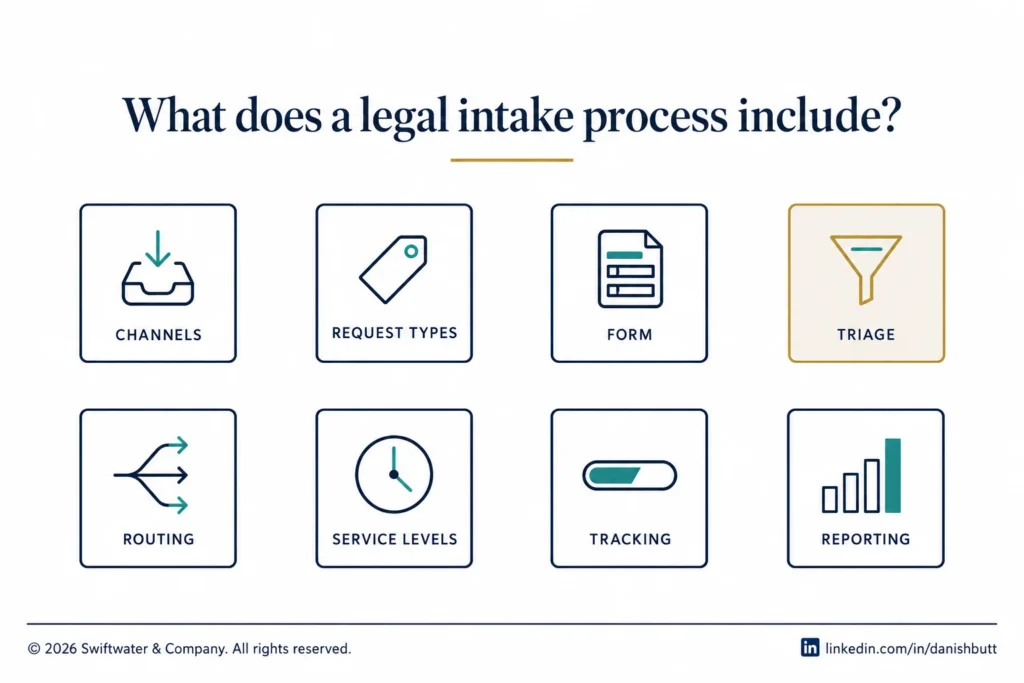
A legal intake process includes eight parts: defined channels, a short taxonomy of request types, a form that asks only what routing needs, triage criteria, routing rules with backup, acknowledgement and service levels, a tracked record with visible status, and reporting on volume, cycle time, and outcome. Departments usually have three or four of them and assume the rest.
- Channels. The defined ways a request may be submitted: a web form, a portal, a ticket in an existing enterprise system, a shared mailbox that feeds the form, a Teams or Slack entry point. The decision that matters is which single record every channel feeds.
- Request types. A short taxonomy of what the business asks for: contract review, contract drafting, legal question, litigation or dispute notice, regulatory or compliance question, employment matter, IP, corporate approval, data or privacy request. Ten to fifteen types is typical. More than that and requesters guess.
- The form. The questions asked at submission, varied by request type. Covered in its own section below.
- Triage criteria. The rules that decide what happens to a request once it arrives: self-serve, route to a paralegal or legal operations, route to a lawyer, escalate. Covered below.
- Routing. Who receives each request type, by business unit, region, practice area, or value threshold, and what happens when that person is out.
- Acknowledgement and service levels. What the requester hears back, when, and what they can expect for turnaround by request type. Service levels are promises the department can keep, set separately by request type and risk. The business user cares about three things at this point: how the interaction feels, whether they can see where the request is, and when it will be done. Those three behaviors are the inputs to the service level design, ahead of anything legal would choose on its own.
- Tracking. The request becomes a record with a status the requester can see. This is the point at which intake stops being a mailbox and becomes an operation.
- Reporting. Volume, cycle time, source, and outcome, by request type and business unit, reviewed on a cadence.
How do you triage legal requests?
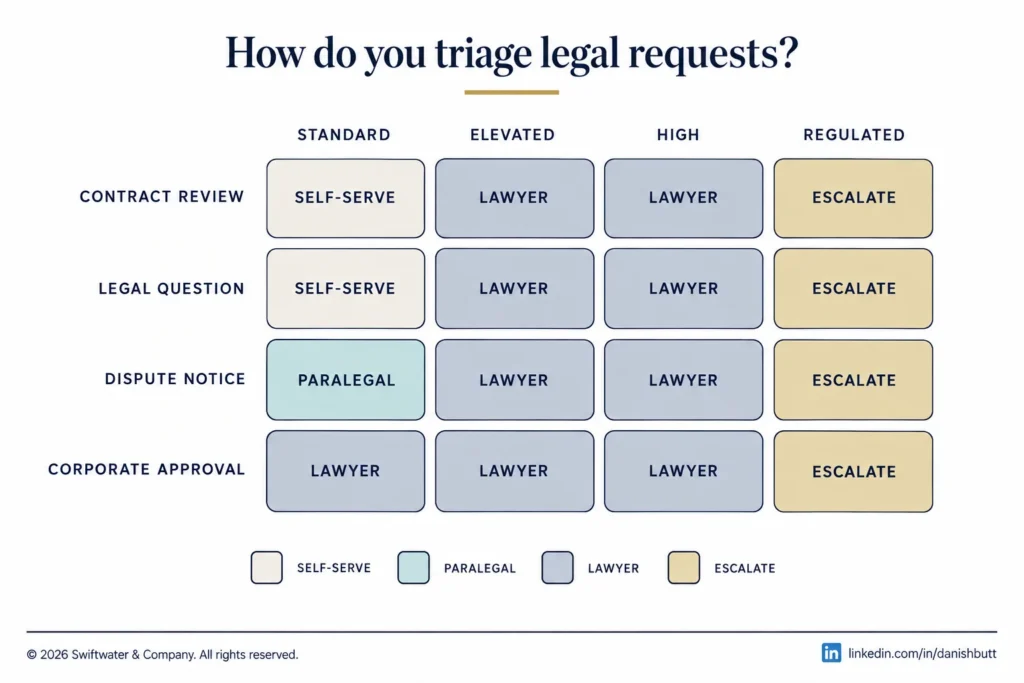
You triage legal requests by applying a rules-based, risk-based matrix that sends each request to one of four outcomes: self-service, legal operations or a paralegal, a lawyer, or escalation. The matrix pairs request type with risk or value indicators, so the decision is the same whoever is on duty and lawyer time goes to the work that carries legal risk.
A working triage model has four outcomes:
- Self-serve. The request is answered by a template, a playbook, a pre-approved form, or a knowledge page. Standard NDAs, routine vendor terms under a value threshold, and frequently asked policy questions belong here. Self-service only works when the resource exists and is easy to find, which is why intake design and knowledge management are usually one project.
- Route to legal operations or a paralegal. Work that follows a defined procedure: entity management filings, signature routing, standard contract assembly, matter opening for outside counsel.
- Route to a lawyer. Work that needs judgment: non-standard terms, disputes, regulatory questions, anything above the risk thresholds the department has set.
- Escalate. Litigation holds, regulator contact, data incidents, and anything the General Counsel has said to see personally. Escalation paths are defined in advance and the form captures enough to trigger them automatically.
The triage matrix behind these outcomes is a simple grid: request type on one axis, risk or value indicators on the other, with the outcome in each cell. It fits on one page. The discipline is in maintaining it, reviewing where requests actually went against where the matrix said they should go, and adjusting thresholds as the department learns.
What should a legal intake form capture?
A legal intake form should capture only what triage and routing need: requester and business unit, request type, a short description, counterparty, value or exposure band, business deadline, attachments, and for contracts whose paper it is and whether the business has already committed. Every field beyond that lowers completion and pushes requesters back to email. The fields that earn their place:
- Requester, business unit, and region, pre-populated from the directory wherever possible.
- Request type, selected from the taxonomy, which then drives the remaining questions.
- A short description in the requester’s own words.
- The counterparty, where there is one.
- Value or exposure band, where the request type has a threshold.
- The business deadline and why it is the deadline.
- Attachments.
- For contracts: paper (ours or theirs), whether a prior agreement exists, and whether the business has already committed.
What the form should not ask for is anything the legal team can look up, anything that duplicates a downstream system, or anything added because one lawyer once wished they had known it. Form length is the single biggest driver of whether the business uses the front door or walks around it.
Which tools support legal intake?
Legal intake is supported by six categories of tool: enterprise legal management intake modules, CLM intake, standalone legal front-door platforms, agentic front doors such as Harvey Intake and Legora Intake, enterprise ticketing and workflow platforms, and the shared mailbox most intake projects exist to replace. The right category depends on where the request record needs to live afterward and how much of the triage the department wants software to do.
| Category | What it does, and where the record lives | Fit and examples |
|---|---|---|
| Enterprise legal management intake | Captures the request and opens a matter directly, routed by matter type. The record is the ELM matter, alongside e-billing and outside counsel data. | Departments whose main volume is matters and outside counsel work. Onit (legal service request intake inside the ELM suite) and the other ELM platforms. |
| CLM intake | Front-ends the contract request and feeds drafting, negotiation, and signature. The record is the contract in the CLM. | Departments where contracts are the dominant request type. The intake modules in the major CLM platforms. |
| Standalone legal front door | One front door across every request type, with triage and routing, then hand-off to the system that owns the work. Its own request record, linked to ELM, CLM, or ticketing. | Departments running several systems that want one entry point. Checkbox, which positions itself as the front door for in-house legal with AI triage. |
| Agentic front door | Captures the request in Slack or Teams, triages it, resolves routine work itself, and prepares a first draft or first-pass review for a lawyer. The record sits in the AI platform workspace, integrated to downstream systems. | Departments already on one of these platforms that want triage and first-pass work automated. Harvey Intake and Legora Intake (both announced October 2026), and Flank (autonomous agents embedded in Slack and Teams). |
| Enterprise ticketing and workflow | Service management or low-code workflow already licensed by IT. The record is a ticket, exported or integrated to legal systems. | A low-cost start with strong routing and service levels and a weaker legal data model. The service management and workflow platforms already in the enterprise. |
| Shared mailbox | Requests arrive by email and are handled or forwarded by whoever reads them. No record that reports. | Very small teams at low volume. The arrangement most intake projects exist to replace. |
Selection follows process design. A department that has defined its request types, triage rules, and routing can evaluate any of these categories in a week. A department that has not will configure whichever tool it buys around undefined work and get an expensive mailbox. For the cost justification, the Legal Tech ROI Calculator models intake alongside the other systems in the stack. The broader selection approach is covered in legal workflow automation.
How is AI changing legal intake?
AI is changing legal intake by moving triage and first-pass legal work into the intake step itself: agentic front doors capture the request in Slack or Teams, triage it, resolve routine requests, and prepare a first draft or first review for a lawyer, and they are only as good as the request taxonomy, triage rules, and playbooks the department has defined.
In the week of October 13, 2026, Legora and Harvey each announced a product called Intake, one day apart, and both describe it the same way: a front door for in-house teams where the business asks in the tools it already uses, an agent triages the request, routine work is resolved on the spot, and anything that needs a lawyer arrives with a draft or a first review already done.
| Legora Intake | Harvey Intake | |
|---|---|---|
| Announced | October 13, 2026 | October 14, 2026 |
| Positioning | Agentic front door for in-house legal teams, built on the Legora Agent | In-house legal front door that routes requests to the right agent, solution, or lawyer, extending Harvey Contract Intelligence |
| Channels at launch | Slack (mention the agent); Microsoft Teams, email, and MCP announced as planned | Described as the tools people already use; specific channels not named at announcement |
| What the agent does | Turns the request into tracked work; prepares a first draft using the team Skills and playbooks | Resolves routine requests; takes a first pass at the rest, including contract review against the team playbooks |
| Availability | Live in Slack at announcement | Early access from October 2026 |
| Named design partners | None named at announcement | Carvana, GE Aerospace, Dentsu |
Three things follow for a legal operations leader. First, the agent is only as good as the triage rules and playbooks it works from. An agent routing against undefined request types routes badly at scale, and a first draft against a thin playbook is a first draft a lawyer has to redo. The process design in this guide is the input, whichever vendor wins. Second, the agentic front door still needs a system of record behind it. Matters still need to exist in matter management and contracts still need to exist in the CLM, so the integration question (where does the record live once the agent has triaged it) is the first question to ask any of these vendors. Third, adoption behaves the same way it always has. An agent in Slack is more convenient than a form, which helps, but the business still routes around any front door that is slower or less transparent than emailing a lawyer they know.
The ELM and standalone front-door vendors are adding the same agentic triage to their existing intake. The likely end state is that agentic triage becomes a feature of every category in the table above, and the choice returns to where the record should live.
How do you measure legal intake?
Legal intake is measured on four numbers: volume by request type and business unit, cycle time by request type reported as a distribution, deflection rate through self-service, and front-door share, the proportion of legal work that entered through defined channels rather than around them. They are the measures that feed legal department KPIs further up.
Building the legal operations function from scratch?
Assessment, roadmap, and delivery for the operational side of the department: spend, technology, process, vendors, and the data that proves what legal delivers. Advice from operators who ran the function.
See Legal Ops Consulting- Volume by request type and business unit. The base number for everything else. It shows where demand comes from, which business units generate disproportionate legal work, and whether volume is growing faster than headcount.
- Cycle time by request type. Submission to first response, and submission to completion. Reported as a distribution, because the long tail is where the business forms its opinion of legal.
- Deflection rate. The share of requests resolved by self-service without lawyer involvement. The measure that proves the triage model is doing its job and the one that most directly frees lawyer capacity.
- Front-door share. The share of legal work that entered through the defined channels rather than around them. Measured by sampling matters and contracts for a corresponding intake record. If this number is low, the other three are measuring a fraction of the work.
Service level attainment by request type sits alongside these once service levels are set. All of them are reviewed monthly in the first year and quarterly after. They are also the numbers that answer the efficiency question most General Counsel are now being asked: Axiom’s 2026 GC Report found 66% of departments received budget increases, averaging 12%, and 90% still face pressure to improve efficiency. Intake data is the first place a department can show where the work goes and what changed.
How do you roll out legal intake without the business routing around it?
Legal intake is rolled out without the business routing around it when lawyers redirect every emailed request to the front door, the form is faster than writing an email, the requester receives an acknowledgement and a visible status, the launch runs business unit by business unit, and front-door share is measured and reported to the General Counsel from the first week.
Intake fails in one way: the business keeps emailing the lawyer it knows. Every other failure is downstream of that one. The rollout plan exists to close that path.
- Lawyers go first. If lawyers accept work by email and quietly handle it, the front door is a formality. The agreement inside the department is that email requests are redirected to the form, with a short, friendly, standard reply, every time, for as long as it takes.
- The form is faster than email. Pre-populated fields, request-type-driven questions, and a two-minute completion time. If the form is slower than writing an email, the business is right to avoid it.
- The requester gets something back. An acknowledgement with a reference number, a visible status, and a realistic turnaround. Visibility is what the business is buying in exchange for using the process.
- Launch by business unit, not big bang. Start with the unit that generates the most volume or has the most to gain, prove the turnaround, and let that unit’s experience carry the next.
- Measure front-door share from week one and report it to the General Counsel. It is the adoption number, and the target for it is full adoption, because partial adoption produces partial data and the department ends up running two processes.
Change management for intake is lighter than for an ELM or CLM rollout because the requester’s job is small. The weight falls on the legal team’s own discipline about redirecting email, and that discipline is set by leadership.
What does a working legal intake process look like in practice?
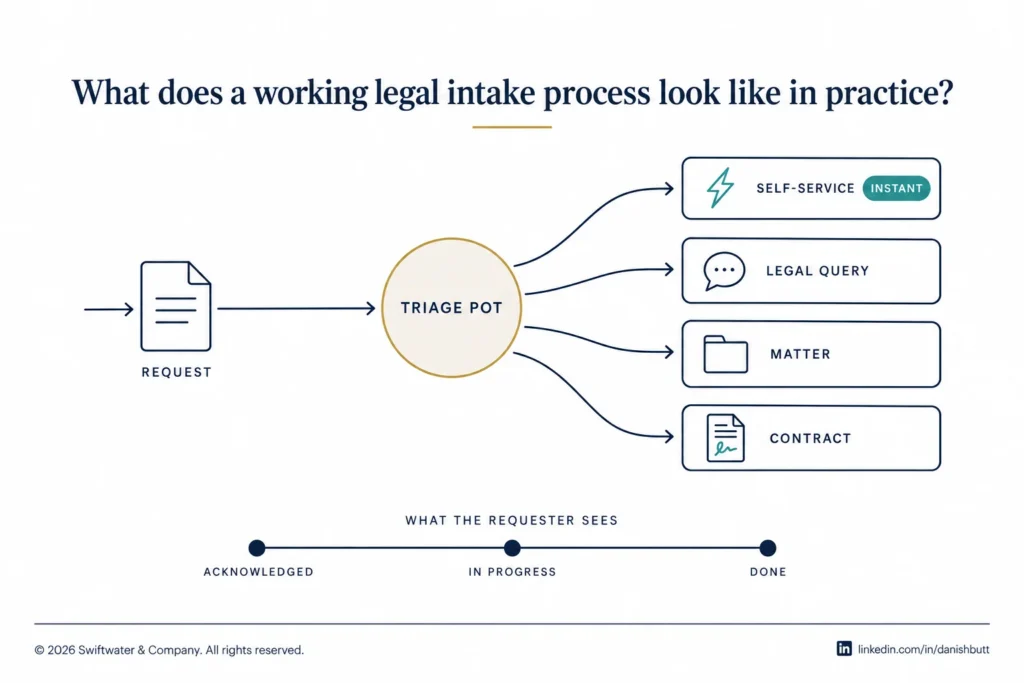
A working legal intake process looks like one front door, a triage pot owned by named triage leaders, self-service for standard requests, and routing the requester never sees into a legal query, matter management, or the CLM. The example is a global retail conglomerate’s legal function that our team at Swiftwater moved off a shared mailbox to 100% adoption.
The conglomerate’s legal function was running on a shared mailbox, and we replaced it with a structured intake process as the first phase of a wider Onit program, ahead of matter management, e-billing, and contract lifecycle management. The lawyers sat across several jurisdictions, so the immediate priority was simply to see the workload: who was asking for what, from where, and how much of it there was.
We built the design around four parts. All requests landed in a single triage pot, assigned to a small group of named triage leaders, so no request depended on which lawyer the requester knew. Self-service handled the request types that did not need a lawyer, starting with NDAs, which everyone in the business now completes without legal involvement. A growing category, influencer contracts, could be anything from a $150 agreement to a $150,000 deal, so we built it for self-service at the low end with escalation rules that pulled the higher-value and non-standard agreements to a lawyer. And we made routing invisible to the requester: a request went down the self-service route and completed instantly, or became a query that legal answered, or became a matter in the matter management system, or was routed into the contract lifecycle management system, without the business user needing to know which system they had just touched.
What the business user cared about was the interface and the interaction, visibility of where their request was, and a realistic expectation of turnaround. We let those three behaviors define the service levels. The result was 100% adoption of the front door, which is what made the downstream matter management and e-billing data complete enough to run the department on. It is the same sequence we recommend to every department that asks where to start: intake first, because everything else is built on its data.
Bottom Line
Legal intake is the process that turns the business’s requests into a defined, tracked, measurable flow of work, and it is the foundation every other legal operations capability sits on. A working process has defined channels, a short request taxonomy, a form that asks only what routing needs, rules-based triage with a self-service path, routing with service levels, a visible record, and reporting.
Need the function run, not just advised on?
Swiftwater embeds senior practitioners directly into legal operations, handling bill review, matter management, and program delivery on your behalf.
See Managed ServicesThe tool comes after the process, whether the tool is a form, an ELM module, or an agent in Slack, and the rollout succeeds or fails on whether lawyers redirect email. Design the front door before you buy one, and measure how much of the work actually comes through it.
Swiftwater designs and implements legal intake across ELM, CLM, and standalone front-door platforms, and our managed legal operations teams run it afterward. The place to start is a free technology consult.
Frequently Asked Questions
What is legal intake?
Legal intake is the process by which the business requests legal work and the legal department captures, triages, routes, and tracks it. It covers the channels a request may come through, the information collected, the rules that decide who handles it, and the record that lets the requester and the department see its status.
What is the difference between legal intake and legal triage?
Intake is the whole process from request to tracked record. Triage is the decision step inside it: whether a request is self-served, routed to legal operations, routed to a lawyer, or escalated, based on request type and risk.
What should a legal intake form ask?
Only what triage and routing need: requester and business unit, request type, a short description, counterparty, value or exposure band, business deadline, attachments, and for contracts whose paper and whether the business has already committed. Form length is the main reason requesters avoid the front door.
Which software is used for legal intake?
Intake is a module inside enterprise legal management and contract lifecycle management platforms, a standalone category of legal front-door and legal service request tools, and a use case for enterprise ticketing and workflow platforms. The right category depends on where the request record needs to live afterward.
How do you measure a legal intake process?
Volume by request type and business unit, cycle time by request type reported as a distribution, deflection rate through self-service, and front-door share, meaning the proportion of legal work that entered through defined channels rather than around them.
How do you get the business to use legal intake?
Lawyers redirect email requests to the form consistently, the form is faster than writing an email, the requester receives an acknowledgement and visible status, rollout goes business unit by business unit, and front-door share is reported to the General Counsel from the first week.
What is the difference between Harvey Intake and Legora Intake?
Both are agentic front doors for in-house legal teams announced one day apart in October 2026. Legora Intake launched live in Slack with Teams, email, and MCP planned, and prepares first drafts from the team Skills and playbooks. Harvey Intake routes requests to the right agent or lawyer, resolves routine ones, and performs first-pass contract review against playbooks, with early access from October 2026. Both depend on the department having defined request types, triage rules, and playbooks for the agent to work from.
Does an agentic intake tool replace a legal intake process?
No. The agent performs triage and first-pass work against the request taxonomy, triage rules, routing, and playbooks the department has defined, and the request still needs a system of record for matters and contracts downstream.
Does legal intake apply to small legal departments?
Yes. A three-lawyer department gains the same visibility and workload control from a defined front door as a large one, and can run it on a form and a shared tracker before it needs dedicated software.
This article is provided for informational purposes and reflects Swiftwater’s experience designing and implementing legal intake for corporate legal departments. It does not constitute legal advice. Vendor capabilities described reflect public announcements as of October 2026 and should be verified with the vendors before any decision.