
You need a dedicated contract lifecycle management (CLM) system when your contracts outgrow what your ERP, CRM, or document management system can handle: too many things to track, too many approvals to route, or too many obligations to miss. Most companies already keep contracts in systems they own. The ERP knows what was paid to a supplier, the CRM knows what a customer agreed to buy, and a shared drive holds the signed PDF. None of them can tell legal which contracts renew next quarter, who approved a non-standard discount, or whether a supplier met its service levels.
This guide looks at what each system does well with contracts, the signs that you have outgrown it, how a CLM connects to the systems you keep, and how to check that you are ready. It is part of our contract lifecycle management guide; for named platforms grouped by fit, see CLM tools.
Is CLM a CRM tool?
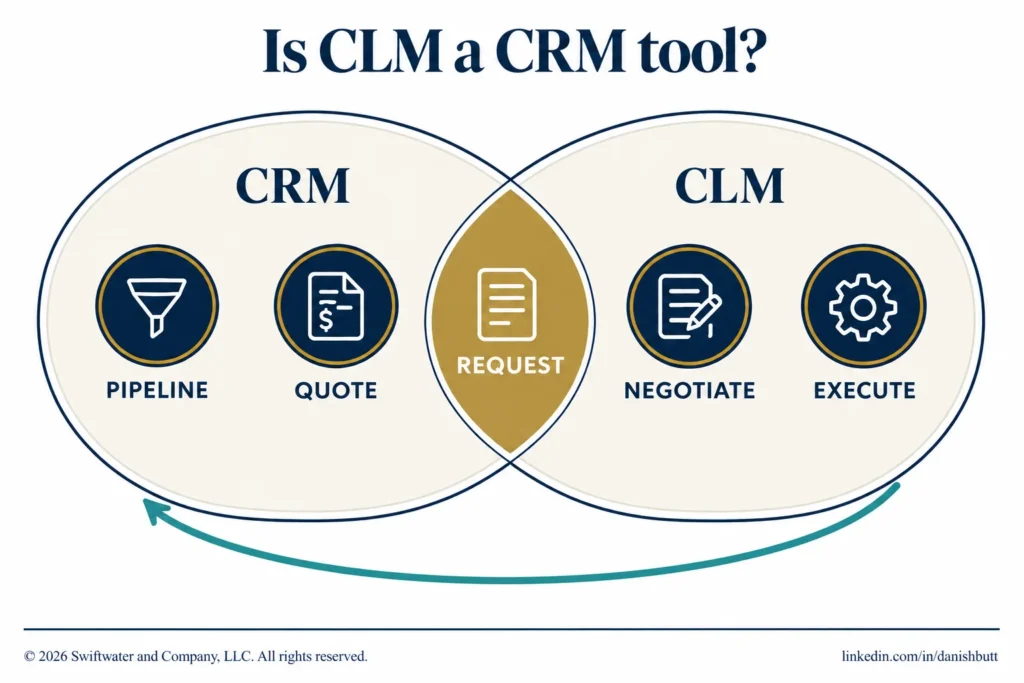
CLM and CRM are separate categories. A CRM manages customers, pipeline, and quotes. A CLM manages the agreement itself, from the request through negotiation, approval, signature, obligations, and renewal. The two meet at the contract request, which is often raised from a CRM opportunity, and they exchange data again after signature, when executed terms flow back to the customer account. Some CLM products are built to run inside a CRM.
As a contract system, a CRM falls short: it has no legal review workflow, no template control, and no view for the procurement and finance stakeholders who never open it. CLM tools by fit covers the CRM-native products, and where contracts should live across Salesforce, CLM, and ServiceNow settles who owns the record.
Can your existing systems manage contracts?
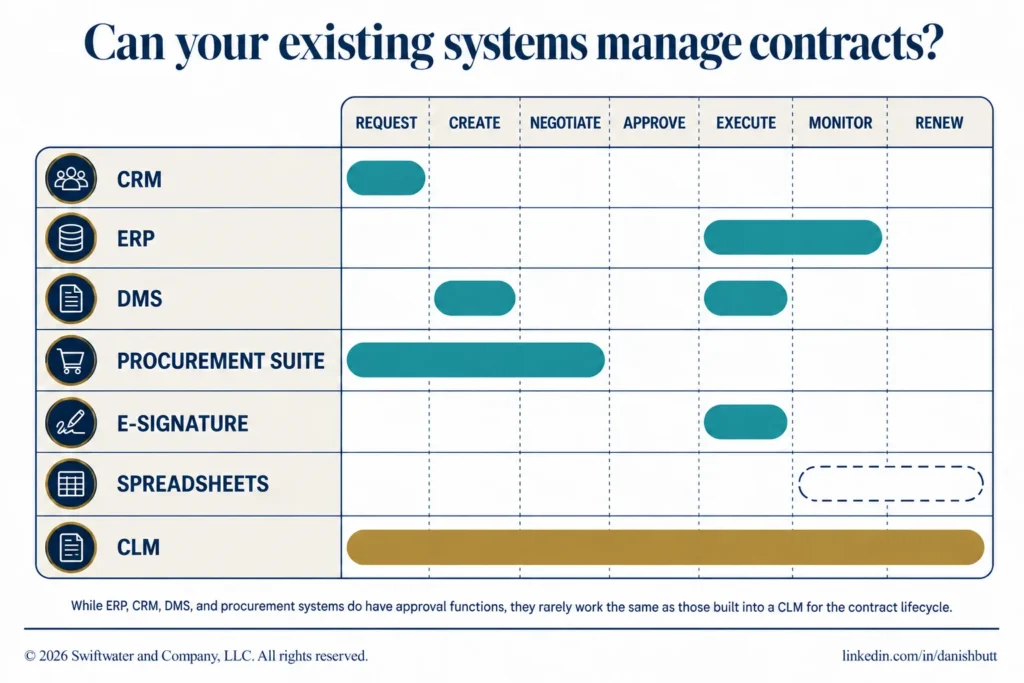
Partly. Each general-purpose system handles one slice of the contract lifecycle well and breaks where contracts need routing, obligation tracking, or renewal alerts. The question is where each system’s ceiling sits against the seven stages of the contract lifecycle, from request to renewal.
I have covered these boundaries in more depth for the Association of Corporate Counsel; the summary follows.
ERP
An ERP such as SAP or Oracle is good for the money side of a contract: purchase orders, invoices, and payment terms. It is weak at drafting, negotiation, approvals, and obligations, which sit unread in an attached PDF. An ERP is enough when contracts matter mostly as records behind spend.
Evaluating or implementing a CLM platform?
We have guided legal departments through selection, implementation, and adoption, without the vendor bias. Let us talk about where you are and what you actually need.
See CLM ServicesCRM
A CRM such as Salesforce or Microsoft Dynamics is good for where a sell-side contract starts: the opportunity and the quote. It is weak once the agreement leaves sales, because legal review, approvals, and post-signature tracking happen elsewhere. Sales contract management covers how sell-side teams fit CRM and CLM together.
Document management system (DMS)
A DMS such as SharePoint is good at storing, searching, and versioning files. It holds the document without tracking the obligations, dates, and approvals inside it. Newer DMS products add workflow and signature features, though rarely with a CLM’s depth on approvals and renewal reminders. A DMS is enough when volume is low and terms are simple.
Procurement suite
A procurement suite is good at sourcing and supplier onboarding, and many include a contract module. Those modules vary, and buy-side contracts often still need legal routing and obligation tracking elsewhere. AI is raising the ceiling: Gartner predicts that by 2027, 50% of organizations will support supplier contract negotiations through the use of AI-enabled contract risk analysis and editing tools (Gartner, May 2024). See contract management in procurement for the buy-side view.
E-signature
An e-signature platform such as Docusign or Adobe Acrobat Sign is good at execution and the signature record. It covers one stage of the lifecycle and hands the signed copy to wherever contracts are stored. See execution and signature for how signature types differ.
Spreadsheets and email
Spreadsheets and email are workable at low volume, with a handful of contracts and one disciplined owner. They fail first on renewals, version control, and audit trails: every field is manual, nothing chases an approval, and the current draft is whichever attachment was sent last.
Custom-built systems
A custom build is rarely the right answer once maintenance, integrations, and audit requirements are counted. It fits on day one and ages badly as developers move on and integrations need rebuilding. It suits only an unusual contracting model that no platform serves.
| System | What it handles well | Where contracts break |
|---|---|---|
| ERP | Purchase orders, invoices, payment terms | Drafting, approvals, clause-level obligations |
| CRM | The opportunity and the quote | Legal review and post-signature tracking |
| Document management system | Storage, search, versions | Obligations, dates, approval routing |
| Procurement suite | Sourcing and supplier onboarding | Legal routing and obligation tracking |
| E-signature | Execution and the signature record | Everything before and after signature |
| Spreadsheets and email | Low volume with one owner | Renewals, version control, audit trail |
| Custom-built system | Fit on day one | Maintenance, integrations, audit |
What signals show you have outgrown general-purpose systems?
Six signals show you have outgrown general-purpose systems: missed renewals, untracked obligations, approval bottlenecks, scattered repositories, version confusion, and audit exposure. The switch is rarely triggered by one dramatic failure. It follows an accumulation of small ones, and two or more of these signals appearing regularly is the practical threshold where a dedicated system starts to pay for itself.
- Missed renewals. Contracts auto-renew before anyone reviews terms or pricing.
- Untracked obligations. Deliverables, service levels, and compliance requirements have no owner and no dates.
- Approval bottlenecks. Contracts wait days because nobody can see whose desk they are on; contract workflow design fixes the routing.
- Scattered repositories. Signed agreements live across drives and inboxes, and nobody can produce a complete list for a contract repository.
- Version confusion. The negotiation record is a chain of attachments.
- Audit exposure. A regulator, acquirer, or auditor asks for contract data, and the answer takes weeks.
Research by WorldCC (formerly IACCM) finds the average business loses almost 9% of value annually through poor contract management; the best performers lose about 3% and the worst 15% or more. A few years ago I worked with a large pharmaceutical company spinning off a division; midway through diligence, the legal team found it was missing a few hundred key contracts. It ended well, and a central contract system would have spared everyone the alarm. The benefits of CLM guide sets out the wider business case.
Which contracts belong in a dedicated CLM?
The high-volume and high-risk contract families belong in a dedicated CLM first: NDAs, master service agreements, statements of work, supplier agreements, and customer agreements. One-off agreements can wait. An inventory of your contract types, with rough annual volumes, is the first input to any system decision and tells you which families to bring in first.
NDAs reward self-service automation. Master service agreements and their statements of work need records that hold up across years of changes. Supplier agreements tie contract records to procurement performance.
How does a CLM integrate with CRM, ERP, and other systems?
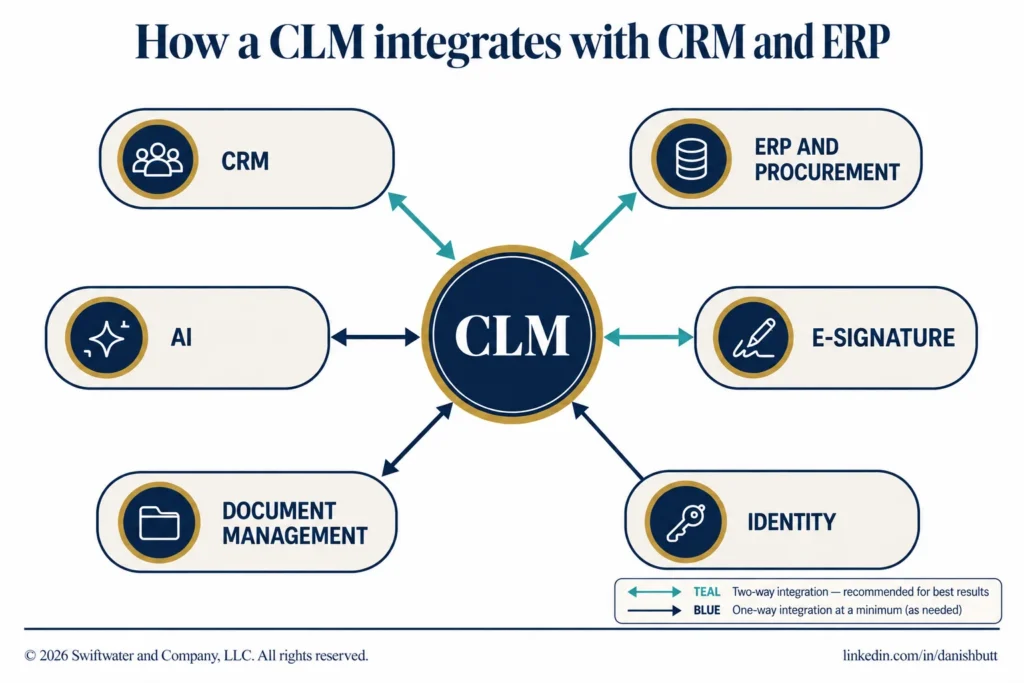
A CLM integrates with the rest of the business through six standard connections: CRM, ERP and procurement, e-signature, identity and access, document management, and AI capabilities. Requests and commercial data flow in from the CRM and ERP, signatures flow through the e-signature platform, and executed contract data flows back to the systems that need it, so nobody re-keys terms from one system into another.
- CRM (Salesforce, Microsoft Dynamics). Requests start from the opportunity, and executed terms flow back to the account.
- ERP and procurement (SAP, Oracle). Purchase orders, vendor records, and payment terms connect to the contract.
- E-signature (Docusign, Adobe Acrobat Sign). Execution runs through it, and the signature record returns with the executed copy.
- Identity and access. Single sign-on and directory services control who can see and approve what.
- Document management (SharePoint). Working drafts and related files stay where teams keep them.
- AI capabilities. Extraction, summarization, risk flags, and obligation capture, with AI contract review for first-pass review.
Integrations are built with prebuilt connectors for common systems and APIs for everything else. WorldCC reports that, on average, contract-related data is scattered across 24 different systems. In a 2026 WorldCC survey of 170 organizations (the WorldCC and Sirion study), only 27% stored all executed contracts exclusively in a CLM system, and 54% had no automated data flow between systems; only 9% had bidirectional synchronization.
Where should the contract system of record live?
The contract system of record should live in one system the organization names on purpose, usually the CLM repository for executed agreements. The CRM and ERP then hold the fields they need, such as contract value, dates, and status, by integration. Naming the system matters more than which system it is, because two systems that each think they hold the record produce conflicting answers to the same question.
Evaluating legal technology but not sure where to start?
We help legal departments cut through the vendor noise, mapping technology to process maturity and building a roadmap that actually gets adopted.
See Legal TechnologyAs the figures above show, few organizations have a single trusted record yet. The contract repository guide covers what the record holds, the boundary guide covers Salesforce and ServiceNow, and ELM vs CLM helps legal teams also weighing a matter management platform.
Are you ready for a dedicated CLM?
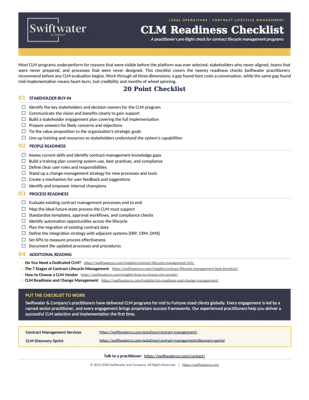
Readiness for a dedicated CLM comes down to three checks: stakeholder buy-in, people readiness, and process readiness. Run them before you evaluate vendors: gaps found now cost far less than gaps found mid-implementation. The one-page CLM Readiness Checklist (PDF) carries the twenty checks our practitioners recommend, ready to print.
- Stakeholder buy-in. Identify the stakeholders, communicate the vision, and answer concerns early.
- People readiness. Assess skills, plan training, define roles, and plan readiness and change management.
- Process readiness. Map your current contract lifecycle, standardize templates and approvals, and plan migration and integrations.
Then turn the gaps into a CLM requirements checklist, read how to choose a CLM vendor before any demo, and plan the rollout with the CLM implementation plan, starting with a contract intake pilot. Once live, follow the CLM best practices.
Bottom Line
Every general-purpose system keeps a slice of the contract: the ERP holds the spend, the CRM the deal, the document management system the file. The useful question is which system owns the executed record, and whether the others connect to it.
Start from the six signals and the readiness checks, then write requirements, then talk to vendors. Name the system of record first, then connect the ERP, CRM, and document management system to it, and the question of a dedicated CLM usually answers itself.
Swiftwater’s contract management consultants assess how your contracts run today, check your readiness for a CLM, and run a vendor-neutral selection when a dedicated platform is the right call.
Frequently Asked Questions
Do you need a CLM if you already have an ERP?
You need a dedicated contract lifecycle management (CLM) system when your contracts outgrow what your ERP, CRM, or document management system can handle: too many things to track, too many approvals to route, or too many obligations to miss. An ERP handles the purchase order and payment side of a contract well. The CLM handles drafting, approval, obligations, and renewals, which sit outside the ERP’s data model. Most organizations that start in the ERP add a CLM and connect the two.
Do you need both a CLM and a document management system?
At scale, often yes. A document management system usually holds far more than contracts: the supporting documents, research, memos, images, and patent references that sit behind an agreement, organized by matter or project. The CLM runs the contract workflow and tracks what is inside the executed agreement: owners, dates, obligations, and renewal alerts. The two connect so the contract record can point to the supporting files without copying them.
Can a CLM platform trigger tasks in other business systems?
Yes, through prebuilt connectors or APIs. A signed contract can create a vendor record or purchase order in the ERP, update the account in the CRM, or open a renewal task for the contract owner. Agree during implementation which events start which tasks, and which system owns each piece of data.
Do you really need CRM and e-signature integrations in a CLM?
An e-signature integration is close to essential, because almost every contract passes through signature and the signed copy has to land back in the repository. A CRM integration earns its cost when sell-side volume is high enough that re-keying deal data into the CLM wastes time or introduces errors.
Can a CLM push contract data back to a CRM?
Yes, where the integration is bidirectional. Contract value, dates, and renewal status can flow back to the customer account. Agree which fields the CRM needs and which system owns each one, so the two never disagree. The Salesforce, CLM, and ServiceNow boundary guide sets out the ownership questions.
Do small legal teams need a dedicated CLM?
Not always. A small team with modest volume, simple contract types, and a disciplined owner can run well on templates, a shared repository, and calendar renewals. Risk matters more than headcount: a three-person team managing high-value agreements with layered obligations reaches the ceiling of general-purpose tools sooner. Let the six signals decide.
When is a custom-built contract system the wrong answer?
A custom-built system is the wrong answer for most organizations, because it fits on day one and ages badly: the developer moves on, integrations need rebuilding, and enhancements compete with revenue work for engineering time. It is defensible only for an unusual contracting model no platform serves. If the motivation is cost, maintenance usually erases the savings within a few years.
This article is provided for general informational purposes only and is not legal, financial, or business advice. CLM and contract system decisions should be validated against your organization’s specific structure, regulatory obligations, and counsel guidance, and you should consult a qualified professional for advice on your situation.