

A Legal Tracker administrator is the person who runs a company’s Thomson Reuters Legal Tracker instance: users, law firms, billing rules, matters and reporting. The role goes by several names, including Legal Tracker admin, Tracker Coordinator and system administrator. This guide covers what the administrator does, what makes the role different on Legal Tracker, the recurring tasks and reports, the skills and training the role needs, the options when the administrator leaves, and how the job changes after a merger. For the platform itself, see our guide to what Legal Tracker is.
What does a Legal Tracker administrator do?
A Legal Tracker administrator keeps the company’s instance of the platform accurate and usable. The work covers user accounts and roles, the law firm and vendor records, the billing rules and rates that invoices are checked against, matter setup and data quality, and the reports legal leadership reads. The administrator is also the first contact for company users and law firm users with a question, and the link between the legal department and Thomson Reuters support.
Thomson Reuters describes the job in similar terms. As of November 28, 2026, its help site names a Tracker Coordinator, “the person identified at your company who’s generally responsible for all aspects of Tracker,” who gives first-level support to company and law firm users. The same help site describes a Company System Administrator role with full access to all matters and setup pages, which it says “should be used as sparingly as possible.” In many departments, the coordinator and the system administrator are the same person.
What makes the Legal Tracker administrator role different?
The Legal Tracker administrator role carries more hands-on work than its title suggests. In our experience, four areas set it apart: law firm support that sits with the company’s own coordinator team, eBilling workflows that need design and steady upkeep, reporting that often continues outside the platform in Excel, and integrations with accounts payable or workflow systems that need internal technical cover. Each one adds recurring hours to the role and to any handover.
- Law firm support sits with the internal coordinator. In some other platforms, the vendor’s team carries more of the law firm support. Legal Tracker’s approach puts that effort on the company’s coordinator team: helping firms with technical and setup issues, making sure security and access are set up properly, and onboarding new firms.
- eBilling workflows need design and upkeep. Departments that need multiple approval paths or divisions have to understand how to set them up. Swiftwater practitioners see that once invoices and budgets route by matter, division and firm across many paths, those routes need continuous maintenance.
- Reporting often continues in Excel. The built-in reporting has continued to grow. When a standard report falls short of the question, coordinators export the data to Excel and build their own reports, analysis and visualizations. For reporting built and maintained across systems, see legal operations reporting.
- Integrations need internal technical resources. Organizations with large or complicated integrations with accounts payable or workflow systems need internal technical resources available to manage those integrations.
What are the recurring tasks?
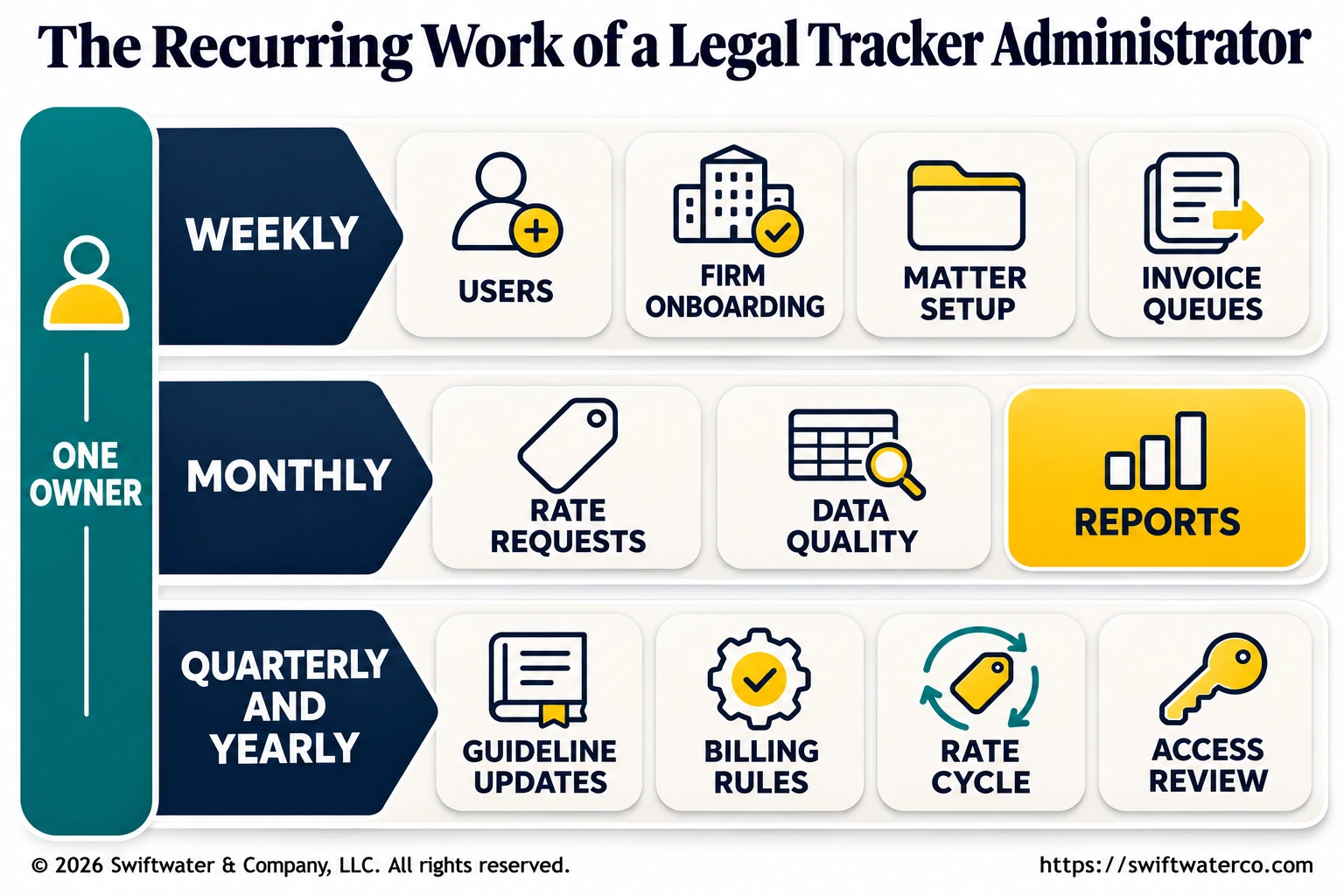
The recurring tasks of a Legal Tracker administrator follow a calendar. Each week, the administrator adds and deactivates users, onboards law firms, sets up matters and clears invoices held in an approval queue. Each month, the work turns to rate requests, data quality checks and the spend and matter reports. Each quarter and year, it covers billing guideline updates, the rules that enforce them, the annual rate cycle and a review of who has access to what.
- Users and access: new accounts, deactivations, role changes and office or region assignments.
- Law firms and vendors: onboarding, technical and setup help, security and access, timekeeper lists and firm records.
- Matters: setup, budgets, reassignments, closures and consistent matter data.
- Invoices and approval paths: routing by matter, division and firm, approval queues, rejections and resubmissions.
- Billing rules and rates: rules kept in line with the billing guidelines, and approved rates loaded on time.
- Reporting: scheduled reports for legal leadership and Finance, and Excel analysis for the questions standard reports leave open.
- Integrations: accounts payable and workflow feeds watched with the company’s technical staff.
- First-level support: answers for users and firms, and escalation to Thomson Reuters when the platform itself is at fault.
In the Blickstein Group’s 18th Annual Law Department Operations Survey, billing and invoice approval (80.0%), matter management (78.5%) and reporting and analytics (76.9%) were legal operations responsibilities at the 68 companies surveyed. The population is small, so read the figures as directional. Invoice review is the task that grows fastest when the administrator is stretched. When checking invoices against the guidelines becomes more than one person can carry, see Legal Tracker bill review.
What reporting does the administrator produce?
The administrator produces the recurring reports that show where outside counsel spend goes and how matters are moving. The usual set covers spend by firm, matter and practice area, budgets against actuals, invoice adjustments made under the billing guidelines, invoice cycle times, open matters and accrual figures for Finance. Each report runs on a set schedule for a named reader, usually the General Counsel, legal operations leadership or Finance, with ad hoc requests handled between cycles.
Running an ELM or eBilling implementation?
Swiftwater has three Level 4 Onit-certified practitioners. If you are evaluating, implementing, or rescuing an ELM program, let us talk about what that actually takes.
See ELM ServicesReports are only as good as the data under them. Matter types, practice areas and firm names entered inconsistently at setup show up later as reports nobody trusts, and data hygiene is part of the reporting job. Workbooks built from exports need the same care, with a note of how each one is built, because they leave with the person who made them.
What skills and training does the role need?
The role needs three kinds of skill. The first is system skill: user roles, matter setup, billing rules, approval path design, data export and the report tools. The second is legal operations knowledge: how billing guidelines, rate cycles, budgets and law firm relationships work in practice. The third is service: helping law firms clearly, recording every configuration change and knowing when to call on technical staff or escalate. The system can be learned in weeks; the judgment takes longer.
Thomson Reuters provides the product training. As of November 28, 2026, its Legal Tracker help site says “in just fifteen minutes, a new user can review our quick reference guides or complete the Tracker online tutorial,” and its setup resources list Legal Tracker tutorial videos and web seminars for implementation. The same setup page says implementation “may be a full-time task for the Tracker Coordinator” in a large law department, and that the coordinator’s tasks take much less time once implementation is complete. Designing approval paths for the department’s own divisions, and knowing which report answers a General Counsel’s question, come from experience in the work.
What are the options when the administrator leaves?
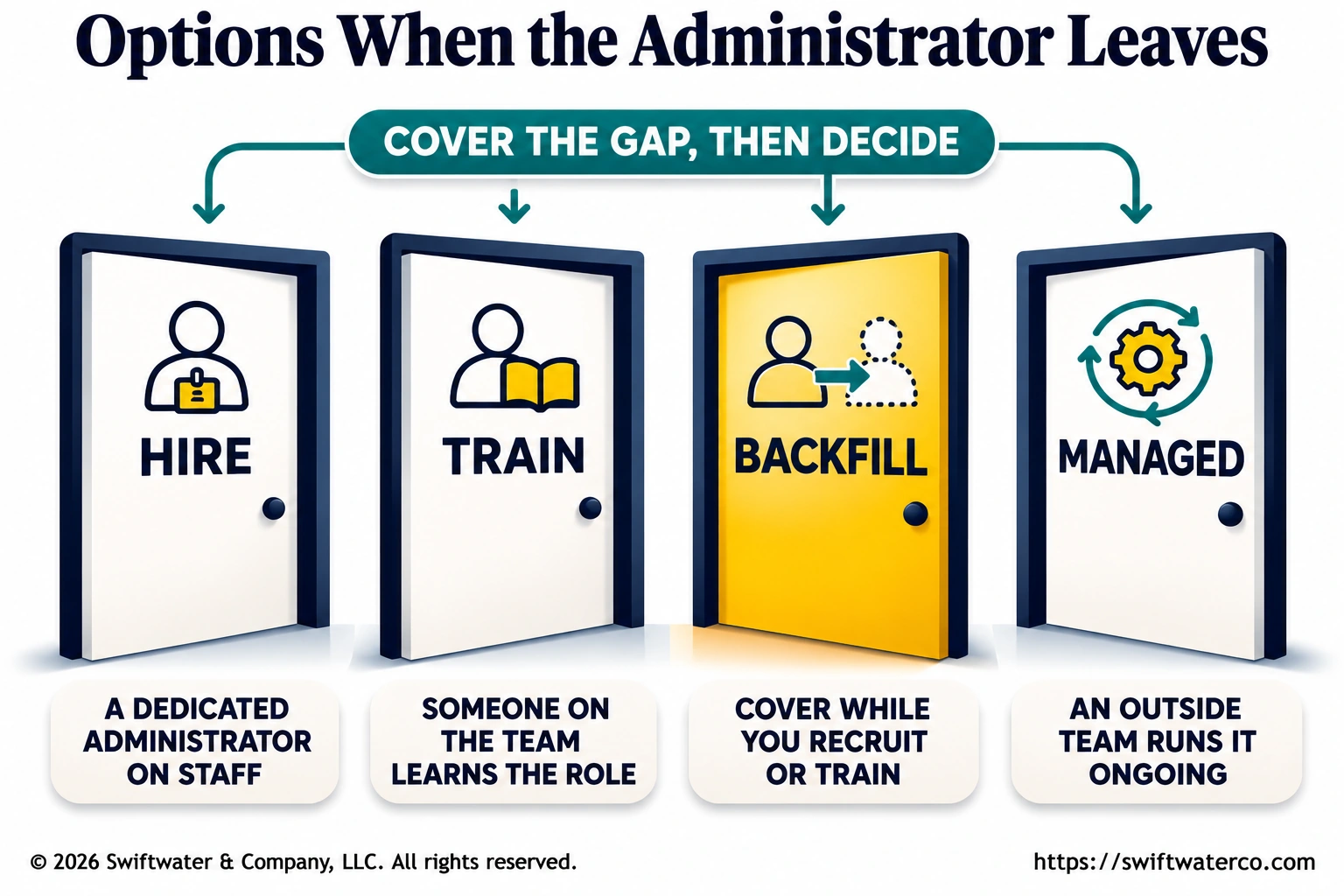
When the administrator leaves, a department has four options: hire a replacement, train someone already on the team, bring in a backfill to cover the gap, or move the work to managed support. The choice depends on how long the gap will last, how much knowledge left with the person and whether the workload justifies a full-time role. The options can also run in sequence: cover the gap first, then decide the permanent model once the instance is stable.
| Option | What it covers | When it fits |
|---|---|---|
| Hire | A dedicated administrator on staff who owns the instance | The workload is full time and the department wants the knowledge held in house |
| Train internally | An existing team member takes on the role and learns the platform | Volume is moderate and someone on the team has the time to learn the system |
| Backfill | A practitioner covers administration while the department recruits or trains | The gap is immediate and users, invoices and reports need cover now |
| Managed support | An outside team runs administration, reporting and configuration on an ongoing basis | The workload is part time, or the department wants cover that stays in place when one person leaves |
Whichever option is chosen, the successor inherits the firm support queue, the approval paths, the Excel reports and the integrations. Many departments also have little bench to draw on when the role falls vacant. The ACC 2026 Law Department Management Benchmarking Report, which covers 576 legal departments in 45 countries, puts the median number of legal operations professionals in a department at zero, and legal operations at 5% of legal headcount. Treat both figures as directional.
Swiftwater’s Legal Tracker support is built for this gap: ongoing administration of your Legal Tracker instance, reporting on matters and outside counsel spend, configuration as your guidelines, workflows and vendors change, and administrator backfill when your Legal Tracker administrator leaves or is out. Engagements are full managed, co-managed or project-based, with no minimum commitment.
How does the role change after a merger of two instances?
After a merger, the administrator’s job becomes consolidation. Two instances mean two sets of users, two law firm lists, two sets of rates, two sets of billing rules, different matter numbering and different reports. The administrator works with legal leadership to decide which instance and which rules carry forward, maps the data between them and keeps both running until the combined instance is live. For that period the workload is closer to a project than to routine administration.
The decisions come first: one set of billing guidelines or two, which firms stay approved, which rates apply to inherited matters and who approves invoices in the combined department. Open matters and invoices in flight need a cut-over plan so firms know where to bill and when. A merger is also the point where many departments ask whether Legal Tracker is still the right platform. For that question, see Legal Tracker alternatives.
Bottom Line
A Legal Tracker administrator is the person who runs a company’s Thomson Reuters Legal Tracker instance: users, law firms, billing rules, matters and reporting.
Want the review function run for you?
Every outside counsel invoice checked against your guidelines, rates, and matter context, inside the eBilling platform you already own, with the exception handling, vendor coaching, and savings reporting that separate a review program from invoice processing.
See Bill Review ServicesOn Legal Tracker the role carries law firm support, approval path upkeep, reporting beyond the standard reports and integration oversight, on a weekly, monthly and quarterly calendar. When the administrator leaves, the options are to hire, train internally, backfill or move to managed support, and the right choice depends on the length of the gap and the size of the workload. Legal Tracker holds the department’s spend data. The administrator is the reason anyone can trust it.
Swiftwater supports corporate legal departments that run Thomson Reuters Legal Tracker: ongoing administration, reporting on matters and outside counsel spend, configuration as guidelines, workflows and vendors change, administrator backfill and migration to or from Legal Tracker. Engagements are full managed, co-managed or project-based, with no minimum commitment. See Legal Tracker support.
Frequently Asked Questions
Is Legal Tracker support included from Thomson Reuters?
A Legal Tracker administrator is the person who runs a company’s Thomson Reuters Legal Tracker instance: users, law firms, billing rules, matters and reporting. Thomson Reuters supports the product itself, with help documentation, training resources and a support team for questions about how the platform works. Running the company’s own instance stays with the administrator the company names, and outside help with that work is a separate arrangement, such as Legal Tracker support.
Can a Legal Tracker administrator be part time?
Yes. Once an instance is set up and stable, the routine work on users, firms, matters, rules and reports can often be covered in part of a week, with more time needed at rate cycles, guideline changes and year end. A part-time administrator works best with a written runbook and a named backup. Swiftwater’s Legal Tracker support covers ongoing administration and administrator backfill, full managed or co-managed.
How do legal teams use Legal Tracker data to drive decisions?
Legal teams use Legal Tracker data to see where outside counsel spend goes, compare firms on cost and billing guideline compliance, track budgets against actuals and set rate expectations for the next cycle. For what the platform records and reports, see our guide to what Legal Tracker is.
What should a handover from a departing administrator include?
A handover should include administrator access reassigned under the company’s access rules; the list of users and their roles; law firm records and contacts; current rates and pending rate requests; the billing rules and approval paths, with the reason for each; scheduled reports, Excel workbooks and who reads them; open invoices and disputes; integrations such as accounts payable or single sign-on; and the contact path to Thomson Reuters support.
Who does a Legal Tracker administrator usually report to?
The administrator usually reports to the head of legal operations, or to the General Counsel’s chief of staff where there is no legal operations lead. In some companies the role sits in Finance or accounts payable, because invoice approval runs through it. Wherever it sits, the administrator needs a named decision-maker in Legal for billing rules, firm approvals and access questions.
What happens to the role if the company moves off Legal Tracker?
The administrator becomes central to the move. They know how the current rules, rates, firm records and reports are set up, and that knowledge decides what carries over to the new platform and what is retired. After the move, the role continues on the new system with the same calendar of work. See Legal Tracker alternatives for the options.
This article is for general information and education and is not legal advice; consult your own counsel on any contract or compliance question. Figures cited are from the sources named and are presented to show direction, not as targets. If you believe any material on this page should be corrected or removed, contact us through the contact form.