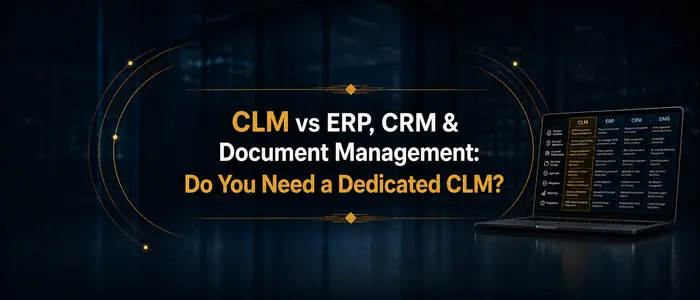

Most organizations already manage contracts somewhere: in an ERP, a CRM, a document management system, or a stack of spreadsheets. A dedicated contract lifecycle management (CLM) system earns its place when contract volume, approval complexity, or obligation risk outgrows what those systems can control. This 101-level guide compares each option from a practitioners stand-point, system by system, and closes with a readiness checklist for deciding when a dedicated platform is warranted. For the full process view, start at the contract lifecycle management hub.
📥 Free download: the one-page CLM Readiness Checklist (PDF)
— the twenty readiness checks Swiftwater practitioners recommend, formatted to print and work through with your team.
Before you read further, you can hear the summary version of this article by our AI Podcasting Duo (courtesy Google NotebookLM AI and Hedra).
Key takeaways
- Contracts already live in your ERP, CRM, document system, email, and spreadsheets. Each of those tools does part of the job, and each has a ceiling you should understand before buying anything.
- The six signals that you have outgrown general-purpose systems are missed renewals, untracked obligations, approval bottlenecks, scattered repositories, version confusion, and audit exposure.
- Readiness matters more than software. The checklist in this guide tells you whether your stakeholders, people, and processes are prepared before you evaluate a single vendor.
Can your existing systems manage contracts? A system-by-system comparison
Every department already runs systems that look and feel like contract management: HR, IT, legal, procurement, sales, and facilities each have their own. The question is where each system’s ceiling sits. I have covered the category boundaries in detail for the Association of Corporate Counsel; the practical summary follows.
Document Management Systems (DMS)
A DMS handles storage and organization well: contracts are filed, searchable, and version-controlled, with basic collaboration on top. Where it breaks is everything a contract does after filing. Newer DMS do provide workflows and signature capabilities. However, they do not provide those as deep as a contract lifecycle management system would as it relates to approval workflows, obligation tracking, or a renewal date reminders. The compliance checks and analytics also live outside the DMS. A DMS is enough when contract volume is low, terms are simple, and a calendar reminder can actually work.
Spreadsheets and manual tracking
Spreadsheets are free, familiar, and flexible, and for a handful of contracts they are honest tools. They break on volume: manual entry drifts out of date, formulas do not chase approvals, and the tracker is only as current as the last person who remembered to update it. Spreadsheets are enough for a small team with dozens of contracts and one disciplined owner. Past that point, the error rate compounds quietly.
Evaluating or implementing a CLM platform?
We have guided legal departments through selection, implementation, and adoption, without the vendor bias. Let us talk about where you are and what you actually need.
See CLM ServicesERP systems
An ERP manages the operational spine of the business, and most include basic contract features tied to procurement and payment workflows. What an ERP sees, however, is the transaction rather than the agreement: it tracks the purchase order and the invoice while the indemnity clause, the renewal option, and the obligation schedule sit unread in an attached PDF. An ERP is enough when contracts matter mostly as records behind spend. Momentum is moving fast here as well: Gartner predicts that half of procurement contract management will be AI-enabled by 2027, which raises the ceiling for procurement paper specifically without turning an ERP into a contract system.
CRM systems
A CRM excels at the relationship around sell-side agreements, and sales teams reasonably want contracts near their pipeline. It breaks as a contract system because it has no legal review workflow, no clause-level control, and no visibility for the procurement and finance stakeholders who never open the CRM. It is enough for tracking which customer signed what, and little more. The deeper architecture question, which system should own the contract record when Salesforce, ServiceNow, and a CLM all touch it, is covered in Salesforce vs CLM vs ServiceNow: where should contracts live.
Email and file-sharing platforms
Email is where contracts are negotiated, and shared drives are where they land, which is exactly the problem: the process leaves no structure behind. There is no status, no ownership, no obligation record, and the authoritative version is whichever attachment was sent last. Email and file sharing are enough only as the transport layer under a real process, never as the process itself.
Custom-built solutions
A custom build fits your process perfectly on day one. It breaks on day four hundred, when the developer has moved on, the integration needs rebuilding, and every enhancement competes for engineering time against revenue work. Custom is enough for a genuinely unusual contracting model that no platform serves, and organizations with that profile are rarer than organizations that believe they have it.
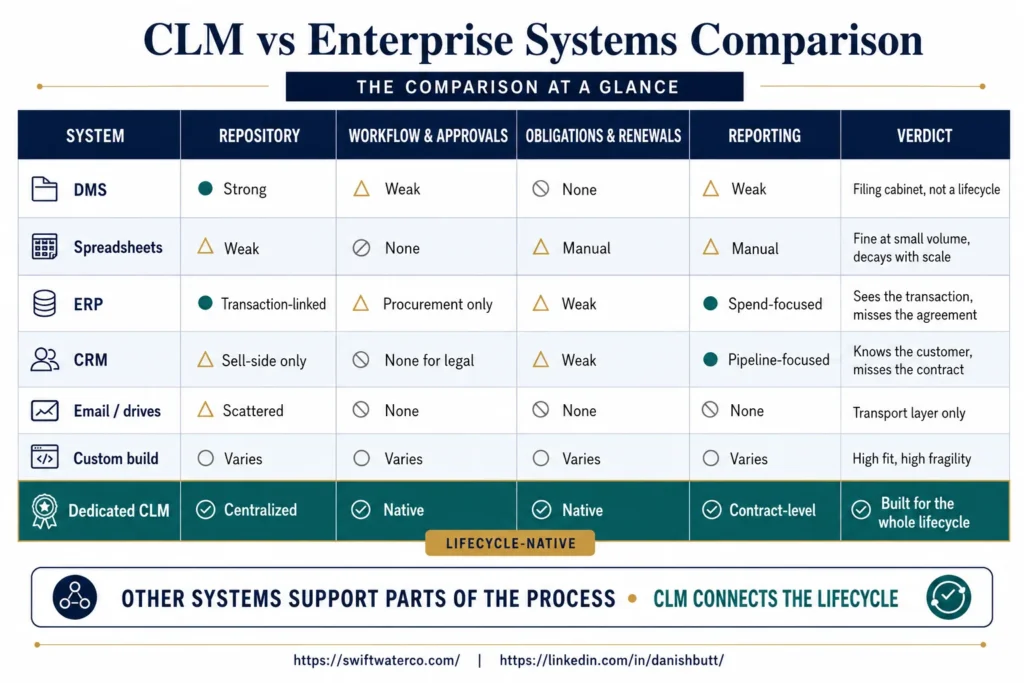
The comparison at a glance
| System | Repository | Workflow & approvals | Obligations & renewals | Reporting | Verdict |
|---|---|---|---|---|---|
| DMS | Strong | Weak | None | Weak | Filing cabinet, not a lifecycle |
| Spreadsheets | Weak | None | Manual | Manual | Fine at small volume, decays with scale |
| ERP | Transaction-linked | Procurement only | Weak | Spend-focused | Sees the transaction, misses the agreement |
| CRM | Sell-side only | None for legal | Weak | Pipeline-focused | Knows the customer, misses the contract |
| Email / drives | Scattered | None | None | None | Transport layer only |
| Custom build | Varies | Varies | Varies | Varies | High fit, high fragility |
| Dedicated CLM | Centralized | Native | Native | Contract-level | Built for the whole lifecycle |
Six signals you have outgrown general-purpose systems
The switch to a dedicated CLM is rarely triggered by one dramatic failure. It is triggered by an accumulation of small ones, and WorldCC’s research puts a number on the accumulation: poor contract management costs organizations almost 9 percent of contract value annually, and 15 percent or more for the worst performers. The six signals worth watching:
- Missed renewals: contracts auto-renew before anyone reviews terms or pricing.
- Untracked obligations: deliverables, service levels, and compliance requirements have no owner and no dates.
- Approval bottlenecks: contracts wait days for sign-off because nobody can see whose desk they are on.
- Scattered repositories: signed agreements live across drives, inboxes, and departmental systems, and nobody can produce a complete list.
- Version confusion: the negotiation record is a chain of attachments, and the authoritative draft is a matter of memory.
- Audit exposure: a regulator, acquirer, or auditor asks for contract data and the answer takes weeks. Two or more of these appearing regularly is the practical threshold where a dedicated system starts paying for itself.
A few years ago, I was working for a large pharmaceutical company that was trying to spin-off one of its division. Mid-way during their diligence the legal team realized they were missing a few hundred key contracts. They either did not have the latest copies or just could not find them. Alarms rang on both sides because it could have significantly affected the deal valuation or derailed the whole exercise. In the end, it was a happy story but a centralized contract management system would have helped.
What kinds of contracts are in scope?
The contract mix of your department, or enterprise, matters because different systems fail on different paper. High-volume agreements such as NDAs reward self-service automation. Long-term frameworks such as master service agreements and their statements of work need structure that survives years of amendments. Supplier agreements tie contract governance to procurement performance. An inventory of your contract types, with rough annual volumes, is the first input to any system decision.
How does the contract lifecycle fit in?
Whatever system you choose has to support the same underlying journey: intake, creation, negotiation, review and approval, execution and storage, monitoring, and renewal. The full walkthrough of what happens at each step, and who owns it, is in The 7 Stages of Contract Lifecycle Management, and the workflow mechanics that connect the steps are covered in contract workflow management. The comparison above is really a question of how many of those seven stages each system can hold.
Ready for a dedicated CLM? The readiness checklist
If the signals point toward a dedicated system, run this pre-flight check before you evaluate vendors. Readiness gaps found here cost far less than the same gaps found mid-implementation.
📥 Free download: the one-page CLM Readiness Checklist (PDF)
— the twenty readiness checks Swiftwater practitioners recommend, formatted to print and work through with your team.
Stakeholder buy-in
- [ ] Identify Key Stakeholders: Identify the key stakeholders involved in the CLM implementation process.
- [ ] Communicate the Vision: Clearly communicate the vision and benefits of the CLM system to gain stakeholder support.
- [ ] Create a Stakeholder Engagement Plan: Develop a plan for engaging with stakeholders throughout the implementation process.
- [ ] Address Concerns: Be prepared to address concerns or objections from stakeholders and provide solutions.
- [ ] Highlight Value Proposition: Emphasize how the CLM system aligns with the organization’s strategic goals.
- [ ] Provide Training and Resources: Offer training and resources to help stakeholders understand the system’s capabilities.
People readiness
- [ ] Skills Assessment: Assess the current skill set of team members and identify gaps in contract management knowledge.
- [ ] Training Needs Assessment: Develop a comprehensive training plan covering CLM system use, best practices, and compliance requirements.
- [ ] User Roles and Responsibilities: Define clear roles and responsibilities for contract management team members.
- [ ] Change Management: Implement a change management strategy to address potential resistance to new processes and tools. See CLM readiness and change management for how to assess this.
- [ ] User Feedback Mechanism: Establish a mechanism for users to provide feedback and suggestions.
- [ ] Champion Network: Identify and empower CLM system champions within the organization.
Process readiness
- [ ] Process Evaluation: Conduct a thorough evaluation of existing contract management processes.
- [ ] Process Mapping: Map out ideal contract management processes to be supported by the CLM system. See how to map your current contract lifecycle for the method.
- [ ] Standardization: Standardize contract templates, approval workflows, and compliance checks.
- [ ] Automation Opportunities: Identify opportunities for workflow automation within the contract lifecycle.
- [ ] Data Migration: Plan for the migration of existing contract data into the CLM system.
- [ ] Integration Strategy: Determine how the CLM system will integrate with other systems.
- [ ] Performance Metrics: Define key performance indicators (KPIs) to measure process effectiveness.
- [ ] Documentation: Create clear documentation of updated contract management processes and procedures.
Where to go deeper (weekend reading)
Here are additional reading materials that I have written from a practitioners stand-point.
- Selecting a platform, and the decisions to settle before any demo: how to choose a CLM vendor
- Running the rollout: the CLM implementation blueprint, starting with a contract intake pilot
- Operating well once live: 10 CLM best practices for 2026
- The business case across functions: the benefits of contract lifecycle management
Bottom line
Every organization manages contracts. It does so in whichever systems happened to be closest when the work arrived. The useful question is whether those systems still control the things that carry risk and value: renewals, obligations, approvals, and a single trustworthy record. Each system in the comparison above has an actual ceiling, and the six signals tell you when you have hit it.
My advice is to choose deliberately: either commit to running contracts well inside the systems you have, or make the case for a dedicated CLM with your readiness confirmed before the first vendor demo.
If you are weighing your existing systems against a dedicated CLM, Swiftwater’s contract management practice begins with a process and readiness assessment that maps what you have, what it can carry, and what a dedicated platform would actually change.
Evaluating legal technology but not sure where to start?
We help legal departments cut through the vendor noise, mapping technology to process maturity and building a roadmap that actually gets adopted.
See Legal TechnologyFrequently asked questions
Can I manage contracts in my ERP?
You can manage the transactional side of contracts in an ERP: purchase orders, invoices, and payment terms tied to procurement workflows. What an ERP does not manage is the agreement itself. Clause-level terms, obligations, renewal options, and legal approval workflows sit outside its data model, usually as attached documents the system cannot read. An ERP is a reasonable home for contract records behind spend, and a poor home for contract risk. Most organizations that start there add a dedicated CLM once obligations and renewals need active tracking.
Is a CRM like Salesforce enough for contract management?
A CRM works well for tracking which customer signed what and where each deal stands, which is why sales teams want contracts close to the pipeline. It falls short as a contract system because it has no legal review workflow, no clause or template control, and no access for procurement, finance, or compliance stakeholders. Sell-side agreements can start in the CRM, and the contract record itself belongs in a system built for the full lifecycle. The architecture question of which system owns the record is worth settling explicitly.
What is the difference between a CLM and a document management system?
A document management system stores and organizes contracts as files: searchable, version-controlled, and secure. A CLM manages contracts as living agreements: it runs intake, drafting from templates, approval workflows, execution, obligation tracking, and renewal alerts on top of the repository. The practical test is what happens after signature. In a DMS the contract is filed and forgotten until someone searches for it. In a CLM the contract keeps working, with owners, dates, and alerts attached to what it promises.
Can spreadsheets work for contract management?
Spreadsheets work at small scale: a modest contract count, simple terms, and one disciplined owner who keeps the tracker current. They fail on volume and complexity, because every field is manual, nothing chases approvals or deadlines, and accuracy depends entirely on habit. If the spreadsheet is the system of record for renewals or obligations at any meaningful volume, the organization is carrying quiet risk. The readiness checklist in this guide is the better next step than a bigger spreadsheet.
When should a business consider CLM software?
A business should consider CLM software when contract volume is growing, approvals take too long, templates are inconsistent, renewals are hard to track, contract data is scattered, or teams need better visibility into obligations, risks, and contract performance. Two or more of those appearing regularly is the practical threshold. At that point the cost of a dedicated system competes against the value already leaking through missed renewals and untracked obligations, and the comparison usually favors the system.
What should companies prepare before implementing CLM?
Before implementing CLM, companies should assess current workflows, identify key stakeholders, clean contract data, define agreement types, standardize templates, document approval rules, clarify ownership, and decide which systems need to integrate with the CLM platform. The readiness checklist in this guide covers the stakeholder, people, and process dimensions in detail. Preparation done before vendor selection consistently costs less than the same work discovered during implementation.
Do small legal teams need a dedicated CLM?
Not always. A small team with modest volume, simple contract types, and a disciplined owner can run well on templates, a shared repository, and calendar-driven renewals. The size of the team matters less than the level of the risk: a three-person legal team managing high-value agreements with layered obligations hits the ceiling of general-purpose tools much sooner than a larger team managing routine paper. Run the six signals against your reality, and let those decide rather than headcount.
When is a custom-built contract system the wrong answer?
Custom builds fit perfectly on day one and age badly: the developer moves on, integrations need rebuilding, and every enhancement competes with revenue work for engineering time. Custom is defensible only for genuinely unusual contracting models that no platform serves, and that profile is rarer than it feels from inside. If the motivation for custom is workflow specificity, modern CLM configurability usually covers it. If the motivation is cost, the maintenance tail typically erases the savings within a few years.
References and additional resources
- Contract (definition), Legal Information Institute, Wex Toolbox, Cornell Law School
- Document Management, Contract Management, Records Management, and Knowledge Management Systems: What Are They, What Do They Do, and What Are the Differences?, Danish Butt, Association of Corporate Counsel (ACC)
- WorldCC, contract value leakage findings
- Gartner, Gartner Predicts Half of Procurement Contract Management Will Be AI-Enabled by 2027
This article is provided for informational purposes only and does not constitute legal, financial, or technology advice. Consult qualified professionals for guidance specific to your situation.