


← Legal AI: The Definitive Guide
Why AI for In-House Legal Teams Is No Longer Optional
Eighty-seven percent of general counsel now report using AI within their teams. That figure – up from just 44% in 2025, according to the FTI Consulting and Relativity General Counsel Report released in March 2026 – is the clearest signal yet that the debate is over. AI in the corporate legal department is no longer an experiment. It is rapidly becoming standard operating infrastructure.
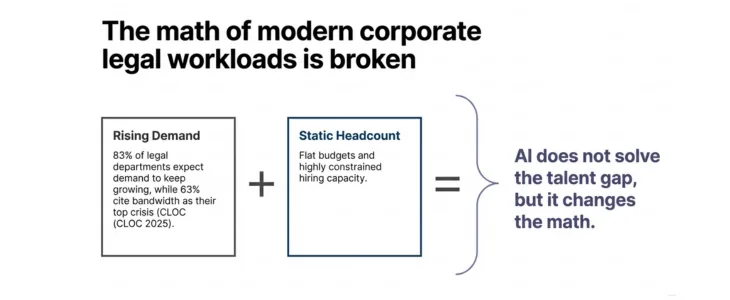
The pressure driving this adoption isn’t subtle. According to the CLOC 2025 State of the Industry Report, 63% of legal departments cite workload and bandwidth as their top challenge, while 83% expect demand for legal services to keep growing. Legal teams are being asked to do more – more contracts, more compliance work, more strategic counsel – with the same headcount and, in many cases, flatter budgets.
AI doesn’t solve the talent gap. But it does change the math. When deployed well, it shifts attorneys from reactive firefighting toward the strategic work that actually moves the business forward.
Readers looking for broader strategy, governance, implementation, and adoption resources can explore Swiftwater’s full Legal AI resource center. This guide is written for General Counsel and Legal Operations leaders who are past the “should we adopt AI?” conversation and are now asking the harder questions: What use cases matter most? How do we evaluate tools without getting burned? What does responsible adoption actually look like?
What Is AI for Legal Departments? A Direct Answer
Legal AI for in-house teams is purpose-built software that uses machine learning and natural language processing to automate, accelerate, and improve the high-volume, judgment-light work that consumes legal department capacity – contract review, legal research, compliance monitoring, document drafting, and intake triage. Unlike general-purpose AI tools, legal-specific platforms are built with privilege preservation, matter structure, and in-house workflows in mind.
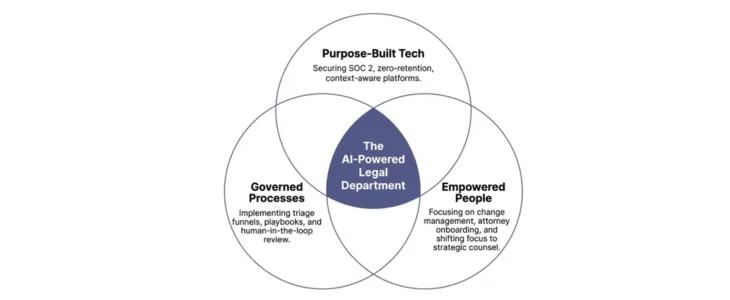
The distinction from generic tools matters more than vendors typically acknowledge. When an attorney inputs confidential matter information into a general AI platform, that data may not be protected under attorney-client privilege. A federal judge’s ruling in US v. Heppner established that information entered into generalist tools may not carry privilege protections because those tools do not offer contractual confidentiality (Note: I am sure there is more analysis, nuances, and clarifications to come on this). Purpose-built legal AI platforms address this explicitly through zero-data-retention architecture, SOC 2 Type II compliance, and legal-specific confidentiality terms.
Thinking about AI but not sure what is actually ready to deploy?
Swiftwater's AI Lab helps legal departments separate signal from noise, identifying where AI creates real leverage and building the governance to use it responsibly.
See Legal AI SolutionsThat is the baseline. Everything else such as speed, accuracy, and, integration, builds on it.
Where AI Delivers Real Value for In-House Legal Teams
The temptation when evaluating legal AI is to focus on the most dramatic use cases: AI doing M&A diligence in hours rather than weeks, AI predicting litigation outcomes. Those examples are real, but they are not where most in-house teams should start. The highest-return use cases are usually the highest-volume, most repetitive work your team is already drowning in.
 Here is where the evidence consistently points:
1. Contract Review and First-Pass Redlining
This is where AI earns its budget line faster than anywhere else. AI tools can review an incoming contract against your playbook, flag non-standard clauses, suggest redlines, and produce a structured issues list, in minutes rather than days. At Bridgewater, Harvey delivered a reduction in vendor contract review from an average of two days to two hours, enabling attorneys to reallocate time to higher-value legal work.
For in-house teams managing hundreds of NDAs, vendor agreements, and customer contracts annually, the compounding effect is significant. Contract review remains one of the fastest paths to measurable AI ROI because the workflow is high volume, repeatable, and highly structured. For a deeper look at available tools and deployment considerations, see What Should In-House Counsel Know About AI Contract Review? A 14% reduction in outside counsel reliance – which GC AI’s December 2025 customer survey documented across more than 100 active accounts – translates to approximately $252,000 in annual savings for the median legal department, which spends $1.8 million on outside counsel according to the ACC Law Department Management Benchmarking Report.
2. Legal Research
In-house attorneys are generalists by necessity. A morning might involve an employment question, an afternoon a data privacy issue, and an evening a commercial dispute. AI research tools provide concise, practically-oriented answers for settled rules without requiring the attorney to wade through case law citations designed for a law firm audience.
The most useful legal AI research tools for in-house teams are designed to give the answer first – not a twenty-page memo – with the supporting authority available if needed. GC AI’s study found that their in-house customers reclaim an average of 14 hours per week. Legal research accounts for a meaningful portion of those savings.
3. Document Drafting and Template Management
Standard agreements, legal correspondence, policy documents, board resolutions – AI tools can draft these from a prompt, calibrated to your company’s standard positions and language. The more your AI platform learns your playbooks and prior decisions, the more accurate its first drafts become.
This has a secondary benefit that is often underestimated: consistency. When AI drafts from your approved positions, you reduce the variability that creeps in when ten different attorneys draft the same type of agreement ten different ways.
4. Compliance and Regulatory Monitoring
Multi-jurisdictional compliance is one of the areas where in-house teams are most exposed and where human bandwidth is least adequate. Tracking regulatory updates across the EU AI Act, DORA, GDPR amendments, state-level privacy laws, and sector-specific requirements is a full-time job that most legal departments cannot staff for.
AI tools that monitor regulatory changes and flag those relevant to your business – based on your industry, geography, and product profile – convert a reactive posture into a proactive one. This matters less for the day-to-day and enormously for the moment something changes in a jurisdiction where you have exposure.
5. Legal Intake and Triage
The “legal front door” problem is one of the most underappreciated productivity drags in corporate legal departments. Legal requests arrive through inconsistent channels – email, Slack, a hallway conversation – and figuring out what needs attention, from whom, and by when is itself a significant overhead.
AI-powered intake tools categorize incoming requests, route them to the right attorney or playbook, respond to low-risk requests automatically, and escalate those that need human judgment. This doesn’t just free attorney time; it gives Legal Operations leaders visibility into demand that was previously invisible. You cannot manage what you cannot see.
Evaluating legal technology but not sure where to start?
We help legal departments cut through the vendor noise, mapping technology to process maturity and building a roadmap that actually gets adopted.
See Legal TechnologyHow to Choose an AI Assistant for Your In-House Legal Team
This is the question that matters most for GCs evaluating the market right now, and it is the question where the most expensive mistakes get made. The legal AI market has expanded dramatically, and vendor claims have outpaced vendor performance in several categories.
We recommend evaluating legal AI tools across five criteria. Leverage this framework before choosing a platform. Teams evaluating vendors often discover that the biggest challenge is not comparing features but determining whether the legal function is actually prepared for deployment. Before moving into vendor selection, consider conducting a legal AI readiness assessment to identify gaps in governance, data, process maturity, and adoption readiness.
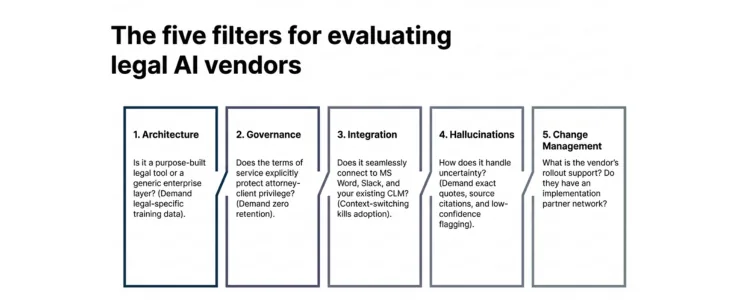
Criterion 1: Purpose-Built vs. General-Purpose
The first filter is whether the tool was designed for in-house legal work specifically, or whether it is a general AI platform with a legal layer built on top. This distinction affects everything: privilege protections, the vocabulary the AI uses, the workflows it supports, and the accuracy of its outputs for legal-specific tasks.
Purpose-built tools understand the difference between “termination for cause” and “termination for convenience.” They apply legal reasoning rather than language pattern-matching. They are designed for the reality of in-house practice – where the attorney needs a practical answer for a business stakeholder, not a treatise.
Questions to ask vendors:
- Was this tool designed for attorneys – or adapted from a general enterprise AI product?
- What legal-specific training data underpins the model?
- Can you show me accuracy benchmarks on in-house legal tasks specifically?
Criterion 2: Security and Data Governance
This is non-negotiable. Before any other evaluation, confirm:
- SOC 2 Type II compliance – most large organizations have this requirement. While it is a best practice, many breakthrough companies are not able to offer this at the get go. So, you may need to draw a balance here.
- Zero data retention – your inputs do not train the vendor’s model
- Private data instance – your company’s data is stored separately, not commingled
- Privilege protections – explicit contractual and technical safeguards for attorney-client communications Governance is increasingly becoming the differentiator between successful AI deployments and stalled initiatives. General Counsel evaluating platforms should establish a formal legal AI governance framework before scaling adoption across the department.
Criterion 3: Integration with Your Existing Stack
AI tools that exist outside your team’s existing workflow will see poor adoption. The best platform in the world fails if attorneys have to switch contexts to use it. Ask vendors for a specific list of integrations and, more importantly, test them. Integration demos in sales cycles are often more polished than the actual integration.
Evaluate for:
- Microsoft Word integration – most contract work still happens in Word
- Email and Slack connectivity – legal intake that meets people where they already are
- CLM compatibility – if you have a contract lifecycle management system, the AI layer should integrate with it, not compete with it
- Matter management connection – task tracking and billing integration where relevant
Criterion 4: Accuracy and Hallucination Controls
Legal AI that produces confident, authoritative hallucinations is worse than no AI at all. An attorney who trusts an AI-generated contract summary that missed a critical indemnification clause is more exposed than one who read the contract manually.
Evaluate how a platform handles uncertainty:
- Does it cite its sources? Can you verify the underlying document?
- Does it flag low-confidence outputs rather than presenting them with false certainty?
- Is there an “exact quote” feature that forces the AI to ground its output in the source text?
- How does it perform on your actual contract types – not vendor-selected benchmarks?
The practical test: run five contracts you know well through any tool you are seriously evaluating. Compare the AI’s output against what you would have caught yourself. The gap tells you more than any demo.
Criterion 5: Adoption and Change Management Readiness
This is the criterion that is least discussed and most predictive of outcome. Technology adoption in legal departments fails more often because of change management than because of technology. Lawyers are skeptical by training. They need to see the value personally before they champion a tool.
Start with those attorneys. Once they are advocates, adoption spreads organically.
Evaluate:
Evaluating or implementing a CLM platform?
We have guided legal departments through selection, implementation, and adoption, without the vendor bias. Let us talk about where you are and what you actually need.
See CLM Services- Is the tool genuinely easy to use, or does it require significant workflow change?
- What onboarding and training does the vendor provide?
- Does the vendor have a customer success function that helps with rollout, or do they drop a license key and disappear?
- Does the vendor have a robust implementation partner network who can effectively help with readiness, process changes, user adoption, data migration, data cleanup and other services?
- Can you identify two or three use cases where the tool will immediately make life better for your most skeptical attorney?
The Risks General Counsel Cannot Ignore
Responsible AI adoption requires looking at the downside with the same rigor you apply to the upside. Here are the four risks that most frequently create problems for in-house teams.
The Privilege Risk
As noted above, the US v. Heppner federal ruling established that attorney-client privilege may not attach to communications entered into general AI platforms. This is not a theoretical risk. It is an active consideration for any attorney inputting matter-specific information into a tool. Use purpose-built legal AI with explicit privilege protections, and make sure your governance policy specifies which tools are approved for confidential matter work. (Note: there are nuanced aspects to the case, so do review the applicability to your circumstance.)
The Hallucination Risk
AI systems generate plausible-sounding content that is sometimes factually incorrect. In legal work, a hallucinated case citation or a mischaracterized contract clause can have material consequences. The practical mitigation is simple: treat AI output the way you would treat work from a first-year associate. Review everything before it goes out. Never let AI-generated content go to a business stakeholder or external counterparty without attorney review.
The Fragmentation Risk
The legal AI market is producing new tools at a pace that makes evaluation difficult. Many legal departments end up with three, four, or five AI point solutions – one for research, one for contracts, one for compliance – none of which talk to each other and all of which require separate logins, training, and governance policies. This is the “whack-a-mole” problem: each vendor delivers something that looks compelling in isolation, but collectively the result is a fragmented stack with unclear ROI and high management overhead.
The countermeasure is a deliberate technology roadmap. Know what problem you are solving before you evaluate tools, not after.
The Adoption Gap
Buying a license is not the same as deploying a tool. Across legal departments, the gap between software purchased and software actively used is substantial. A recent Axiom survey found that the biggest AI risk for many legal departments is not governance – it is the gap between adoption intentions and actual usage. Build adoption into your implementation plan from day one, not as an afterthought.
The Four Stages of AI Maturity in Legal Departments
After working with legal departments across industries, Swiftwater has identified four stages that characterize where an in-house team sits on the AI maturity curve. Knowing your stage is the starting point for knowing what to do next.
Stage 1: Experimenting
Individual attorneys are using AI tools on an ad hoc basis – typically general-purpose tools like ChatGPT or Microsoft Copilot. There is no governance policy, no approved toolset, and no measurement of impact. Usage is driven by personal curiosity rather than departmental strategy.
The risk at this stage: Privilege exposure, inconsistent quality, and no institutional learning.
Stage 2: Standardizing
The department has identified one or two approved AI tools, established a basic governance policy, and begun measuring time savings on specific task types. Adoption is uneven but growing. A Legal Operations function (or equivalent) is coordinating the rollout.
The priority at this stage: Deepening adoption of existing tools before adding new ones, and connecting AI usage to measurable KPIs.
Stage 3: Optimizing
AI is embedded in standard legal workflows. Attorneys use it daily. The department is measuring ROI – time saved, outside counsel spend reduced, contract cycle time shortened. The ELM, CLM, other systems are integrated with AI tools. The legal function is beginning to be seen as a strategic partner rather than a cost center.
The priority at this stage: Connecting AI output to business metrics and building the case for expanded investment.
Stage 4: Transforming
AI is part of the legal department’s operating model, not a tool sitting alongside it. The General Counsel uses AI-generated data to participate in executive strategy discussions. The department has reduced outside counsel dependency significantly. Legal is a competitive advantage for the business.
Most in-house teams today are at Stage 1 or Stage 2. Knowing that – and knowing specifically what is blocking progression to the next stage 0 is where the work begins.
The First 90 Days: A Practical Rollout Playbook
For GCs who are ready to move from evaluation to implementation, here is the framework Swiftwater uses with legal departments at the start of an AI rollout.
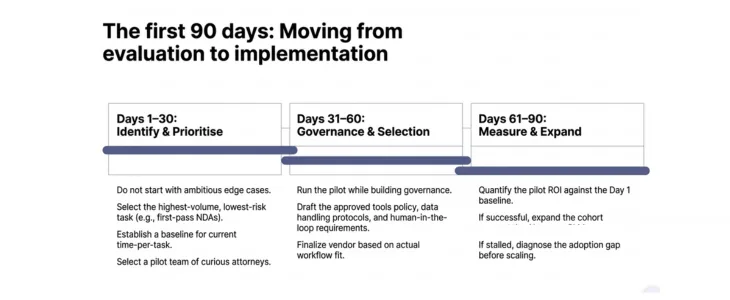
Days 1–30: Identify and Prioritise
Do not start with the most ambitious use case. Start with the highest-volume, lowest-risk task that is currently consuming attorney time. For most in-house teams, that is either first-pass contract review or legal research for standard commercial questions.
Define what success looks like before you start. Time per contract review. Hours per research task. Turnaround time on incoming requests. Establish a baseline now, because you will need it to demonstrate ROI in 90 days.
Select a small pilot team – ideally three to five attorneys who are curious about AI and willing to give honest feedback. Avoid selecting your most resistant attorneys for the pilot. Get wins first, then bring skeptics in once there is evidence.
Days 31–60: Governance and Vendor Finalization
While the pilot is running, build your governance framework in parallel.
Finalize your vendor selection based on pilot performance against the five criteria above – not on sales demos, analyst reports, or what peer organizations say they are using. Your stack needs to fit your workflow, your existing technology, and your team’s actual usage patterns.
At minimum, you need:
- An approved tools policy specifying which AI platforms are cleared for confidential matter work
- A data handling protocol that specifies what categories of information can be entered into each tool
- A human-in-the-loop requirement – every AI output reviewed before external use
- A feedback mechanism so attorneys can flag errors and improve the tool’s performance over time
Days 61–90: Measure, Expand, Connect
At the 90-day mark, measure what actually changed. Did contract review time decrease? By how much? Did research tasks take less attorney time? What was the quality of the output compared to what attorneys produced manually?
If the pilot delivered meaningful results, use that data to build the case for expansion. Bring the next cohort of attorneys in. Connect the AI tool to your CLM system if that integration is available. Begin tracking impact at the department level, not just the individual level.
If the pilot did not deliver clear results, diagnose before expanding. Was it a tool problem, an adoption problem, or a use-case selection problem? Each has a different fix.
Frequently Asked Questions
What is the best AI tool for in-house legal teams?
There is no single best tool – the right choice depends on your team’s primary use case, existing technology stack, and budget. For general in-house legal work, purpose-built platforms like GC AI, Harvey, Wolters Kluwer, Agiloft, Spellbook, Onit and Legora consistently receive strong reviews from legal ops professionals. For contract-intensive workflows, a CLM platform with embedded AI is often more valuable than a standalone AI assistant. The five-criterion evaluation framework above is a more reliable guide than any ranked list.
Is AI safe to use with confidential legal information?
It depends entirely on which tool you use and how. General-purpose AI tools (ChatGPT, Copilot in default configurations) should not be used with confidential matter information – the US v. Heppner ruling is a clear warning. Purpose-built legal AI platforms with SOC 2 Type II compliance, zero-data-retention architecture, and explicit privilege protections are designed for confidential legal work. Always review the vendor’s terms of service and security documentation before inputting sensitive information.
Can AI replace in-house lawyers?
No. AI automates the high-volume, judgment-light work that currently consumes attorney time – first-pass document review, routine research, standard drafting. It does not replace legal judgment, strategic counsel, relationship management, or the professional responsibility that attaches to legal advice. The evidence consistently shows AI as an amplifier of attorney capacity, not a substitute for it. A customer survey recently found that attorneys using AI daily shifted their reclaimed time toward strategic advising and proactive risk planning – work that requires a lawyer.
How much does legal AI cost?
Pricing varies significantly by platform and scope. Most purpose-built legal AI tools charge $50–$300 per user per month for standard tiers, with enterprise pricing negotiated separately. The more useful calculation is ROI: a 14-hour-per-week time saving per attorney at a $200/hour cost rate is approximately $140,000 in recovered capacity annually per attorney. Against that baseline, most legal AI platforms pay for themselves within the first quarter of active use. The Swiftwater Legal Tech ROI Calculator can model this for your specific team size and cost structure.
How long does it take to see ROI from legal AI?
For well-selected use cases with active adoption, ROI is typically visible within 30-60 days. Contract review is the fastest payback because the time savings are immediate and measurable. Research and compliance monitoring take slightly longer to calibrate. The biggest variable is adoption speed – teams that invest in change management see ROI faster than those that treat implementation as a technology project rather than a people project.
What is the difference between legal AI and CLM software?
Contract Lifecycle Management (CLM) software manages the workflow and storage of contracts across their lifecycle – creation, approval, execution, obligation tracking, renewal. Legal AI is the analytical layer that can be embedded within CLM platforms or run alongside them to review, redline, summarize, and flag risk in contract content. Many modern CLM platforms now include AI features; many AI tools integrate with CLM systems. For in-house teams, the question is usually whether to start with AI inside an existing CLM or deploy a standalone AI tool and integrate later. The right answer depends on how mature your current CLM implementation is.
The Swiftwater Perspective: This Is an Operating Model Decision, Not a Tool Decision
After twenty years working in and around corporate legal departments – at Huron, Morae, and now Swiftwater – the pattern I see most often is legal teams treating AI as a procurement exercise when it is actually a transformation exercise.
The tools are table stakes. What differentiates legal departments that get lasting value from AI versus those that stall after the pilot is whether leadership treats AI adoption as a change to how the legal function operates, not just a change to which software it uses.
That means deciding upfront what problems you are solving. It means building governance before you scale. It means measuring the right things from day one. And it means connecting AI adoption to the broader story you are telling as a General Counsel – about the legal department’s role in the business, its value as a strategic partner, and its capacity to do more without proportionally more resource.
That is the work. The tools support it. But the tools do not do it for you.
Model Your AI ROI Before You Buy
The Swiftwater Legal Tech ROI Calculator lets you input your team size, current outside counsel spend, and primary use case to estimate the ROI of AI adoption for your specific department.
Use the Legal Tech ROI Calculator →
Related Reading
- ← Legal AI: The Definitive Guide — the main pillar this page belongs to
Building an AI Strategy for Your Legal Department?
Evaluating tools is only one part of successful legal AI adoption. The larger challenge is aligning governance, operating models, workflows, data readiness, and change management into a scalable program.
Learn how Swiftwater’s Legal AI Solutions help legal departments evaluate, implement, and scale AI responsibly.
Disclaimer: This article is provided for educational and informational purposes only. Neither Swiftwater and Company nor the author provides legal advice. This content does not constitute professional legal, financial, or operational advice and should not be relied upon as such. Readers are encouraged to consult a qualified professional before making decisions based on the information provided. External links are included for reference only and reflect the views of their respective authors. Swiftwater and Company takes no responsibility for third-party content.