


NDA automation moves routine NDAs through a request form, approved templates, self-service for standard terms, and routing for exceptions. Few contracts are better suited to it. Non-disclosure agreements are frequent, similar to one another, and usually low in value, yet they can tie up senior lawyers and hold back the business conversations that depend on them.
This guide walks through an automated NDA process step by step, using screens from a working system, and covers self-service rules, exceptions, templates, and measurement. A free checklist is included below. For what an NDA is and how it differs from other agreements, see our guide to the confidentiality agreement vs NDA. It is part of our contract lifecycle management guide. NDAs are usually the first project in a wider contract automation program.
Why automate NDAs first?
Automate NDAs first because they combine high volume, repeatable terms, and low risk, which makes them the safest place to prove a new process. Ironclad’s 2026 Contracting Benchmark Report puts the average NDA at 12 days to execute, with legal involved 27% of the time. An NDA that takes nearly two weeks can delay a deal before it has properly started.
Routine work also weighs on the people doing it. In the 2021 EY Law Survey, 65% of contracting staff reported regularly working on unchallenging, low-complexity contracts. Moving NDAs to self-service gives lawyers time for higher-value work, and it gives the business a visible early win that builds support for the rest of a CLM program.
What does NDA automation look like step by step?
An automated NDA runs in eight steps: start the request, enter the details, identify the parties, attach documents, route it, review if needed, sign, and track. Standard requests skip the review step entirely. Most of the work is in the design, because the person requesting the NDA should only have to answer a few plain questions before the system decides what happens next.
The screens below come from an NDA process built in Onit, using sample data. Almost all contract lifecycle management, document management, and workflow solutions support NDA automation, so the same steps apply elsewhere. Swiftwater has helped clients automate NDAs and set up self-service using Docusign, Onit, NetDocuments, and other market tools.
Step 1. Start the request. The requester opens one entry point and chooses whether to generate an NDA from a guided template or submit the other side’s document for review.
Evaluating or implementing a CLM platform?
We have guided legal departments through selection, implementation, and adoption, without the vendor bias. Let us talk about where you are and what you actually need.
See CLM Services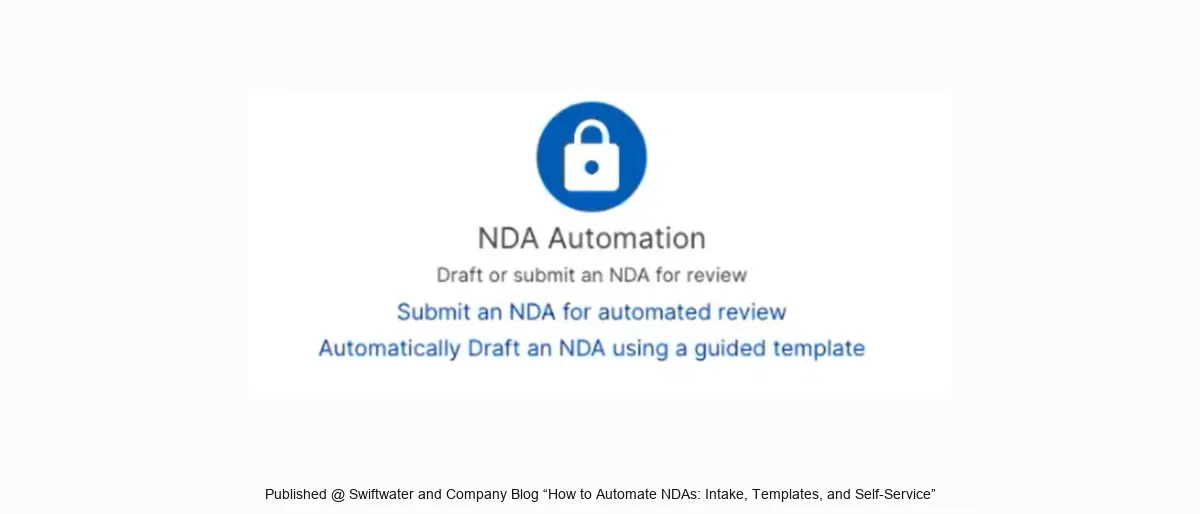
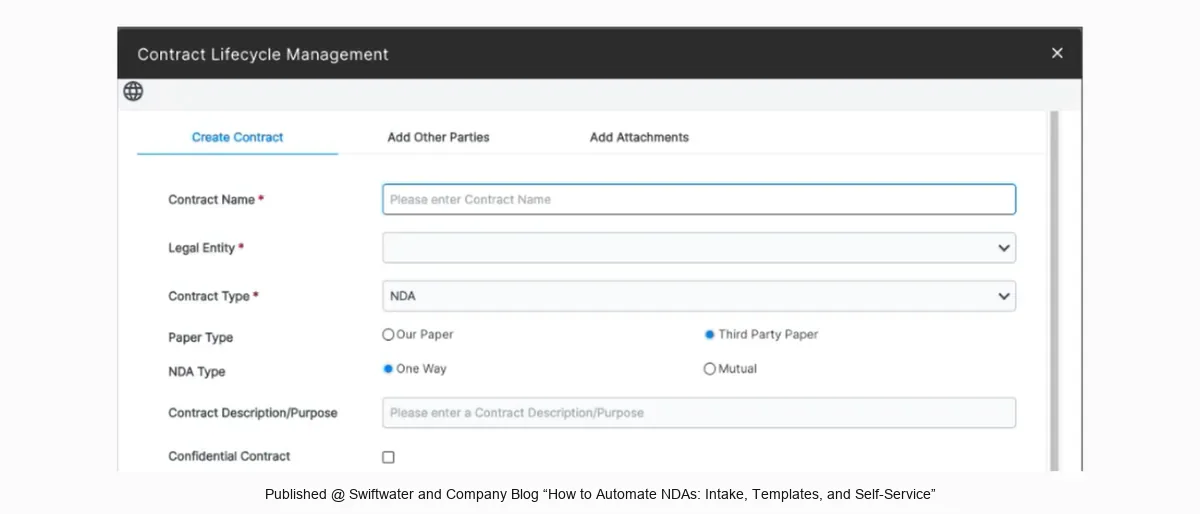
Step 2. Enter the details. The form asks for the contract name, legal entity, whose paper it is, one-way or mutual, and the purpose.
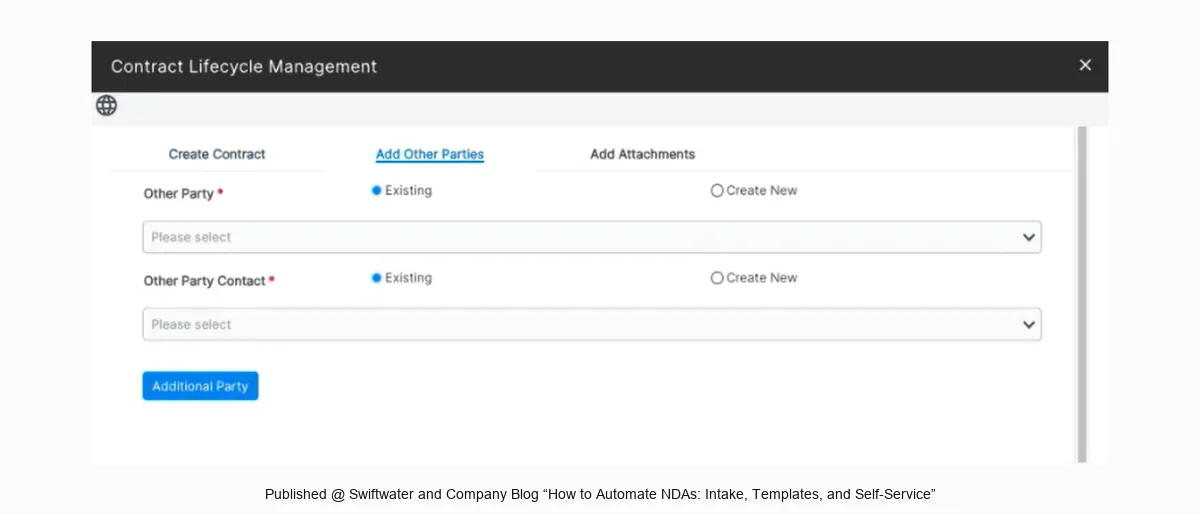
Step 3. Identify the parties. The requester picks the other party and a contact. A connection to the CRM or ERP can fill this in and avoid duplicates.
Step 4. Attach documents. A third-party draft is uploaded here. Standard requests on company paper need no attachment.
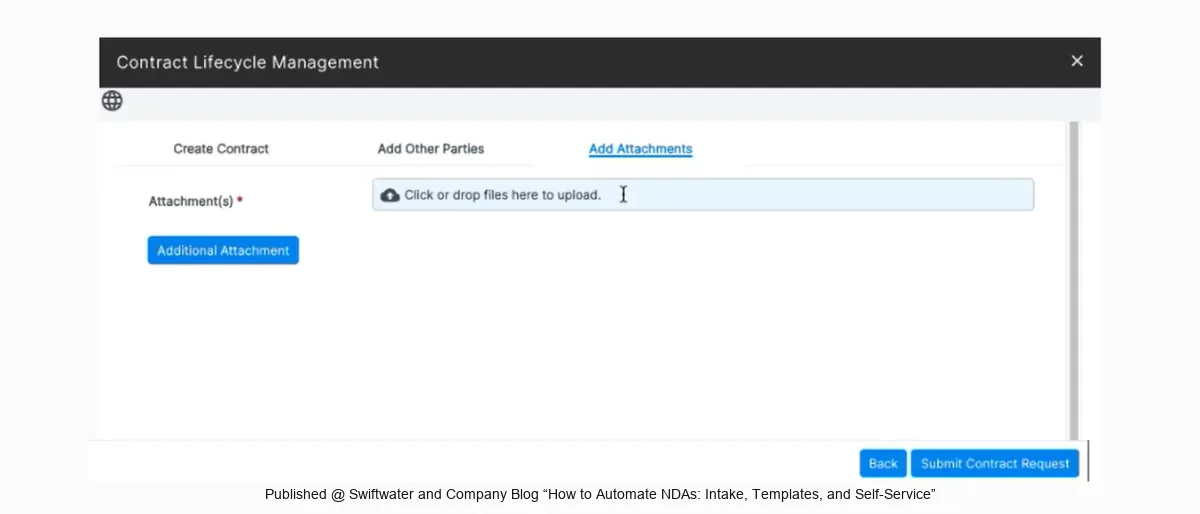
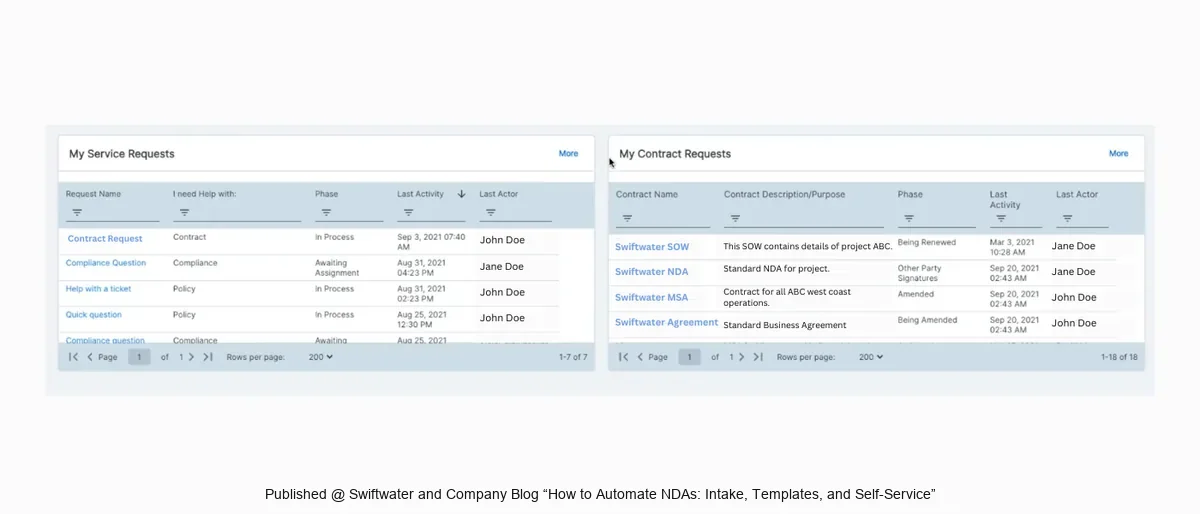
Step 5. Route the request. Rules decide the path. If nothing is flagged, the NDA goes straight to signature. If something is flagged, it goes to a reviewer, and the requester can follow its status.
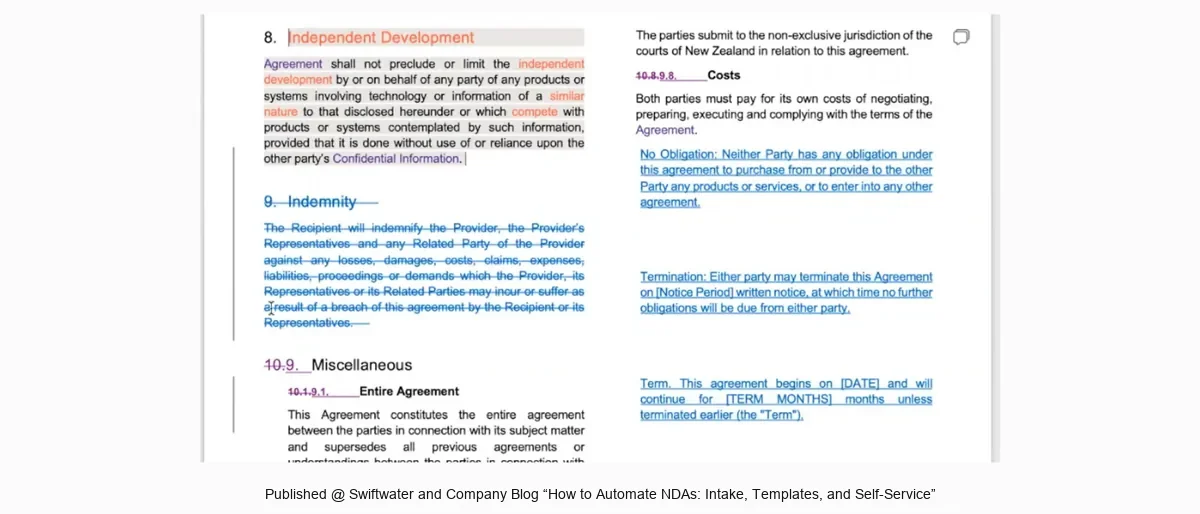
Step 6. Review and redline, if needed. A reviewer works from one record with the details and the documents together, and the system keeps every version. Our guide to AI contract review covers how AI can help at this step.
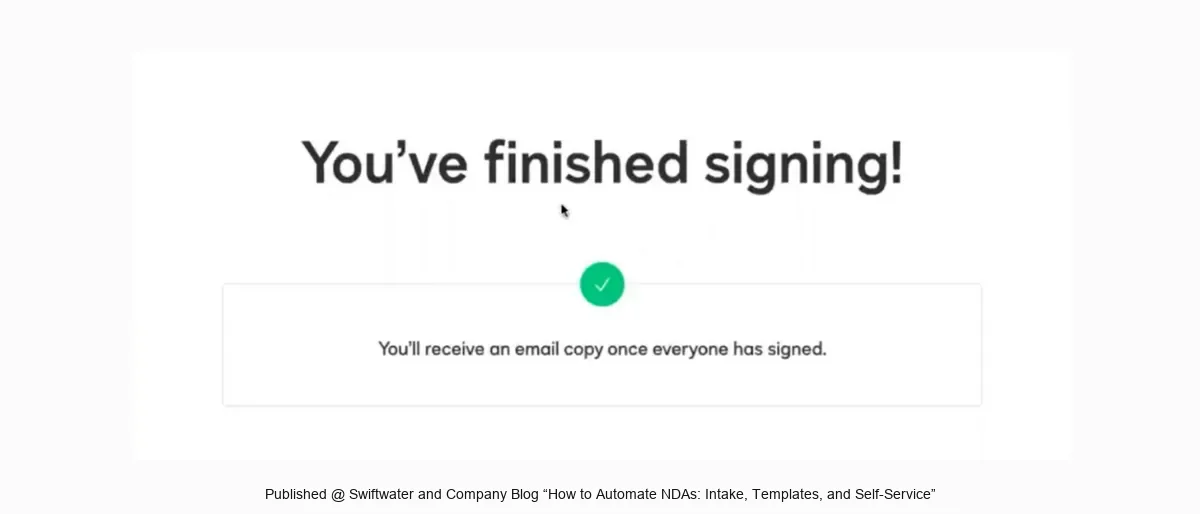
Step 7. Sign. Approved NDAs go out for electronic signature automatically. Where a wet signature is required, our guide to wet signatures and e-signatures explains the difference.
Evaluating legal technology but not sure where to start?
We help legal departments cut through the vendor noise, mapping technology to process maturity and building a roadmap that actually gets adopted.
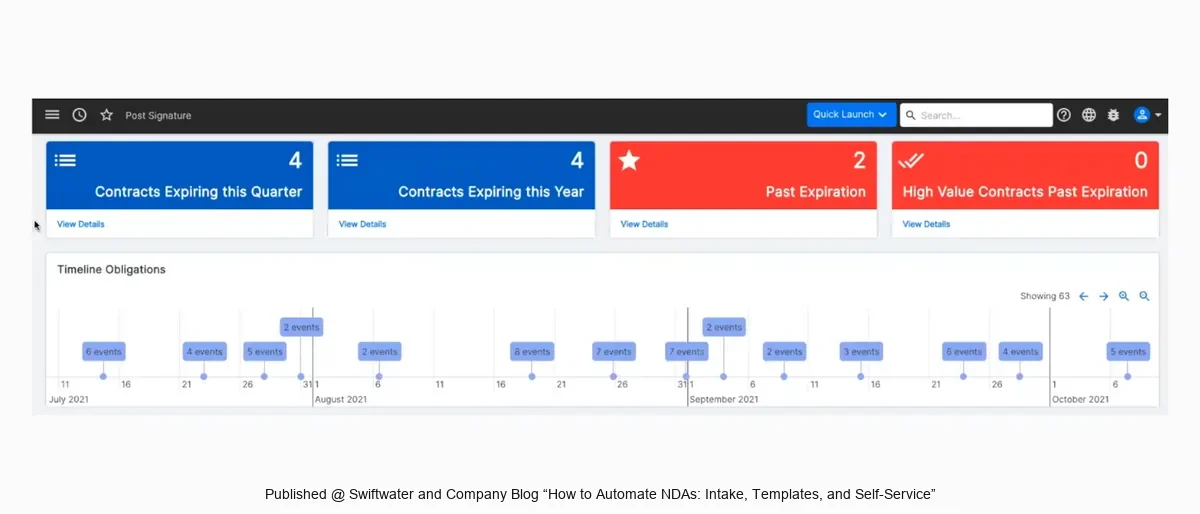
See Legal TechnologyStep 8. Track after signature. The signed NDA is filed in the contract repository, and its dates appear on a timeline for follow-up.
What does an NDA request form capture?
An NDA request form captures just enough to pick the right template and decide the route: who the other party is, which company entity is signing, whether the NDA is one-way or mutual, whose paper is being used, the purpose, and any exception. Each extra question lowers the odds that people will use the form. Ask only for answers that change what happens next.
The form is also where automation connects to the rest of the business. Starting the request from the CRM or procurement system can bring the party details with it, and a single front door keeps NDAs out of inboxes. Our guide to contract request and intake covers how to design one for every contract type.
Which NDAs can be self-service?
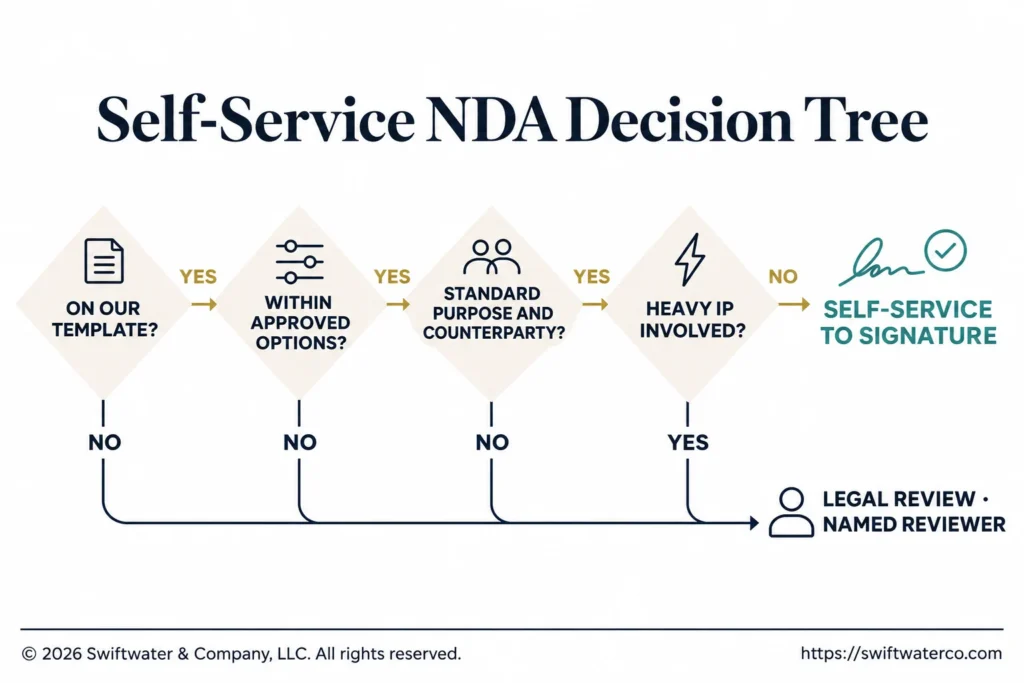
NDAs can usually be self-service when they use your own approved template, stay within pre-approved options, and involve a standard business purpose. Legal defines those limits once, and the business then works within them. Ironclad’s report found that only 15% of NDAs are on counterparty paper, which suggests that a large share start on a company’s own template and could qualify.
Most programs start with a mutual NDA on company paper and a short list of conditions, then widen the list as confidence grows. If negotiations keep stalling on the same point, such as detailed intellectual property language, consider asking counsel whether it needs to appear in every transaction type or can apply only where relevant. The business users also need to understand what the NDA covers, so that a faster process does not lead to careless disclosure.
How do you route exceptions?
Route exceptions by defining in advance what triggers a review and who receives it. Common triggers include the other side’s paper, a change to approved language, an unusual purpose, or a sensitive counterparty or transaction, such as a private equity deal. Each trigger should have a named reviewer and a target response time, so that a flagged NDA does not simply wait in someone’s queue.
Keep the list of triggers short, and review it after a few months. If most requests are being flagged, the rules are too tight or the template needs work. Our guide to contract workflow management covers routing design in more detail, including what happens when an approver is away.
Where do NDA templates come from?
NDA templates usually come from the legal team’s existing standard forms, often a mutual non-disclosure agreement and a one-way version, and counsel should approve whichever version becomes the standard. Teams without a strong starting point can look at open standards. oneNDA and Common Paper’s Mutual NDA are published for anyone to review, and each has its own license terms to check.
A template works better with guidance beside it. Written positions and approved fallbacks tell a reviewer what is acceptable without asking a senior lawyer each time. See our guide to clause libraries, contract templates, and contract playbooks. Whichever language you adopt, have counsel approve it, since this guide covers the process only.
How do you measure NDA turnaround?
Measure NDA turnaround as the days from a complete request to the final signature, and report the median separately for self-service and reviewed NDAs. Combining them hides what automation is doing. Track the self-service rate as well, along with how many requests are flagged and why, since those figures show whether the rules are working or need adjusting.
Compare your results with your own starting point. Published figures such as Ironclad’s 12-day average can give a sense of direction, but definitions vary between companies. Our guide to contract management KPIs sets out how to calculate cycle time and report it.
What does this look like in practice?
In one Swiftwater client engagement, the legal team was receiving roughly 100 NDA requests per month. After standard templates and an intake form that routed requests automatically were in place, the volume reaching legal review dropped to fewer than a dozen per month. Lawyers kept the decisions that needed them, and the business got its routine NDAs without waiting.
The same approach works across a whole legal function. Our legal intake process guide describes how a global retail conglomerate moved its legal requests off a shared mailbox and onto one managed front door, with contract requests among them.
Bottom Line
NDAs are a practical place to start with contract automation, because the risk is low, the volume is high, and the results are easy to see.
Not ready to pick a CLM platform yet?
A four to six week diagnostic that maps your current contract lifecycle, sets requirements themes, and tells you what to buy before you sit through another vendor demo.
See the CLM Discovery SprintThe technology is the simpler part of the work. Agreeing on the template, the limits, and the triggers takes more thought and decides how much reaches legal. Standardize the template, define what can be self-service, route the exceptions, and measure the results.
Swiftwater’s Contract Lifecycle Management practice helps legal teams standardize templates and playbooks, design self-service workflows, implement platforms, and improve adoption.
Frequently Asked Questions
How does NDA automation work?
NDA automation moves routine NDAs through a request form, approved templates, self-service for standard terms, and routing for exceptions. The requester answers a few questions, and the system generates the document or sends it for review. It then goes out for signature, is stored in the repository, and its key dates are tracked.
Why are NDAs good candidates for automation?
NDAs are good candidates for automation because they are high in volume, repeatable, and usually based on standard terms. With an approved template, clear limits, and a short list of exception triggers, many can move through a self-service workflow. That reduces routine legal review and speeds up the business conversations that depend on them.
How can self-service NDAs help legal teams?
Self-service NDAs let business users generate and process standard agreements within approved rules, so that lawyers spend less time on repetitive review. Legal still sets the template and the limits, and it handles the exceptions. The result is faster turnaround for the business, more consistent terms, and more legal capacity for higher-risk work.
What should companies prepare before automating NDAs?
Prepare an approved NDA template, fallback positions, a short set of intake questions, approval rules, exception triggers, signature authority rules, and a place to store signed agreements. Decide how results will be measured before launch. A simple playbook explaining when legal review is required will help both reviewers and the business users.
Can e-signature platforms route NDAs for legal approval before sending?
Some can, and the depth varies by platform. E-signature tools with workflow features can add approval steps before a document goes out, while CLM and workflow platforms usually offer fuller routing based on contract type and exceptions. Test how each handles a third-party NDA, a changed template, and an approver who is away.
How does AI help with NDA review?
AI can compare an incoming NDA with your playbook, flag terms that fall outside approved positions, and suggest edits for a reviewer to accept or reject. It is most useful on third-party paper. Test it on your own NDAs and languages before relying on it, and keep a person responsible for the final decision.
This article is provided for general informational purposes only and is not legal, financial, or business advice. It covers the process of managing NDAs and does not provide guidance on contract wording. NDA and contract decisions should be validated against your organization’s specific structure, regulatory obligations, and counsel guidance, and you should consult a qualified professional for advice on your situation.