

A clickwrap agreement requires a click to accept online terms, and a browsewrap relies on use of the site. Those two designs sit at opposite ends of how online contracts are formed, and the difference shows up when someone later has to prove what a user agreed to. Most people accept these agreements without reading them. For the companies presenting them, the operational question is whether they can show who accepted which terms, and when.
This short video from Docusign shows how clickwrap works.
How clickwrap works: a two-minute demo of Docusign Click, from Docusign.
This guide explains how the main types of online agreement differ, how acceptance is captured and kept, what courts have looked for, and how to manage these agreements at volume. It is part of our contract lifecycle management guide. This article talks about the operational aspects of online contracts. Please consult counsel on the legal aspects.
What is a clickwrap agreement?
A clickwrap agreement is an online contract that a person accepts by taking a clear action, such as clicking “I agree” or checking a box, after being shown the terms or a link to them. It is widely used for software subscriptions, app downloads, and account sign-ups. The action is what matters: it gives the company a specific event to record, tied to a specific version of the terms.
Because the format is simple and repeatable, clickwrap suits agreements that are standard and high in volume, where individual negotiation is impractical. Business-to-business teams also use it for routine documents such as order terms, data processing terms, and policy acknowledgments.
What is a browsewrap agreement?
A browsewrap agreement is a set of online terms that a site treats as accepted when someone simply uses the site. The terms are usually reached through a link, often in the page footer, and the user is not asked to do anything to agree. The approach causes no friction for visitors, but it leaves the company with little evidence that a particular person saw the terms.
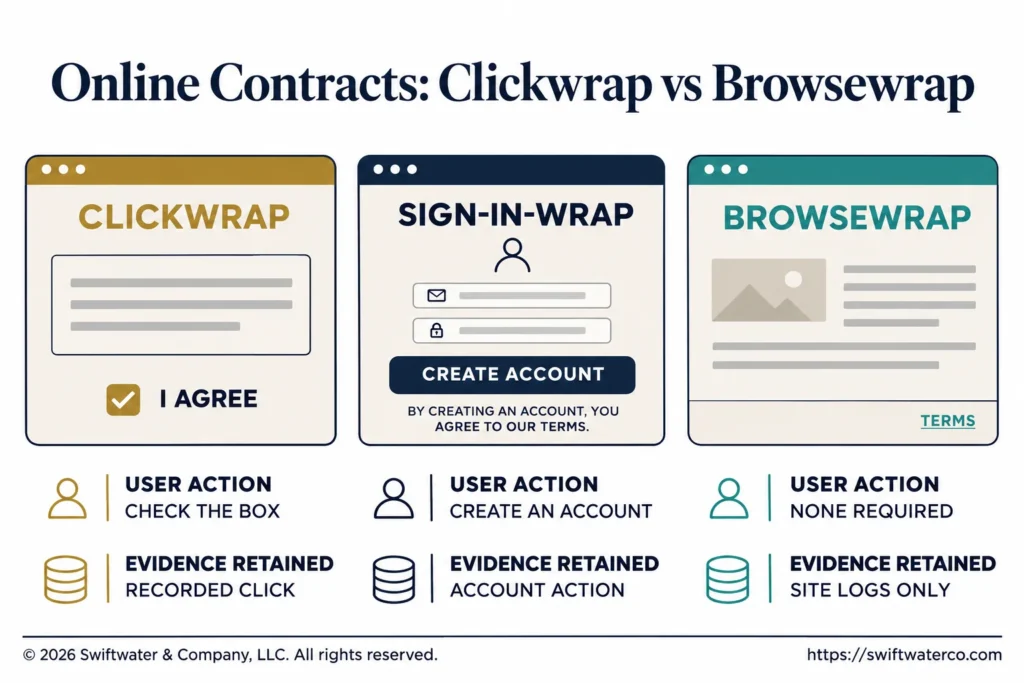
| Type | How acceptance happens | What it leaves as evidence |
|---|---|---|
| Clickwrap | A click or checked box on the terms | A recorded action tied to a version |
| Sign-in-wrap | A notice that signing up means agreeing | The account action and the screen shown |
| Browsewrap | Continued use of the site | Site logs, with no specific action |
What is a click-through agreement and how does it differ?
A click-through agreement is usually another name for a clickwrap: the person clicks through a screen to accept the terms. Some teams use “click-through” for agreements accepted within a sales or purchasing flow and “clickwrap” for sign-up screens, but there is no fixed distinction. The more useful comparison is with sign-in-wrap, where a notice says that creating an account or continuing counts as agreement.
Evaluating or implementing a CLM platform?
We have guided legal departments through selection, implementation, and adoption, without the vendor bias. Let us talk about where you are and what you actually need.
See CLM ServicesThe sign-in-wrap sits between the other two. The user does act, but the action is aimed at something else, such as creating an account, so the design of the notice carries more weight. When teams compare the formats, they should look at what the screen shows and what the user must do, since the labels vary from one company to the next.
How is acceptance captured and retained?
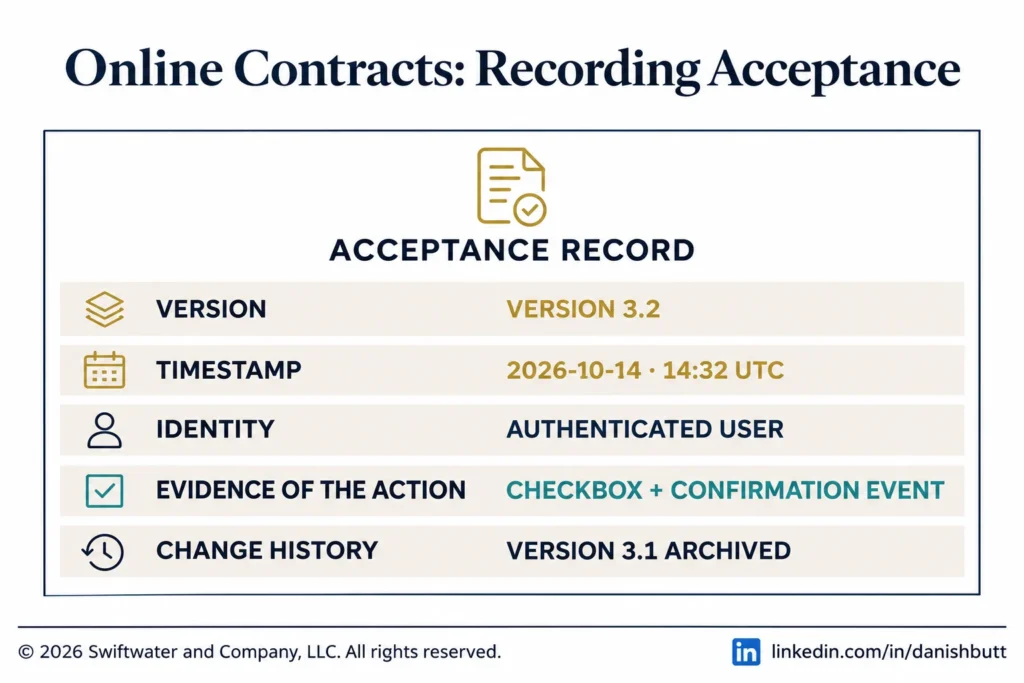
Acceptance is captured by recording, at the moment of the click, who accepted, which version of the terms they saw, when it happened, and what the screen looked like. Those records need to stay retrievable for as long as the agreement matters. In the United States, the ESIGN Act addresses electronic records generally, including that retained records remain accurate and capable of being reproduced.
- Version: the exact text of the terms in force, with an identifier and effective date.
- Timestamp: the date and time of acceptance.
- Identity: the account, email address, or other identifier of the person who accepted.
- Evidence of the action: what was clicked, along with a copy of the screen as it appeared on that device.
- Change history: notices of later updates, and any new acceptance.
Old versions of the terms have to be kept along with the new ones, because a dispute usually concerns what was in force on the day of acceptance. Keeping the screen design matters for the same reason: a page that has since been redesigned cannot show what a user saw. Accessibility also counts, and the Web Content Accessibility Guidelines are the common reference.
Are clickwrap agreements enforceable?
Clickwrap agreements have generally fared better in court than browsewrap agreements, because they involve a clear action. Courts tend to ask whether the person had reasonable notice of the terms and whether they clearly agreed. Outcomes depend on the facts, the jurisdiction, and the terms themselves, so your counsel should review any specific agreement or acceptance flow. The summary below reports what published sources say.
Ironclad’s review of 2020 court decisions reported success rates of 70% for clickwrap, 64% for sign-in-wrap, and 14% for browsewrap, a vendor-published figure worth reading as direction. A Boston Bar Journal review contrasts two US appellate cases: in Specht v. Netscape the reference to the terms was visible only after scrolling to the next screen and they were not enforced, while in Meyer v. Uber the notice was “clearly visible, in contrasting color on an uncluttered screen” and they were. In Berman v. Freedom Financial, a 2022 Ninth Circuit decision summarized by Kilpatrick Townsend, the terms were not enforced because they were not conspicuous enough to a reasonable consumer.
The operational lesson is that design decisions are also evidence decisions. Involve counsel when acceptance screens are designed or changed, and make sure product teams cannot alter them without review.
How do you manage online agreements at volume?
Manage online agreements at volume by treating the terms as controlled documents and the acceptances as data. One team should own the current version of each agreement, changes should go through a defined approval, and each acceptance should be stored where it can be found. When volumes are high, dedicated clickwrap tools or a CLM platform can handle this better than application logs.
- Assign an owner for each set of online terms, and record who approves changes.
- Publish new versions on a planned schedule, and notify users as counsel advises.
- Connect the acceptance tool to CRM and billing, so that sales and finance can see the status.
- Test the acceptance flow on phones and after each product release.
- Be able to pull the full acceptance record for one customer quickly.
Vendors offering dedicated clickwrap products include Ironclad and Docusign, with Docusign Click. These tools record an active click, so browsewrap, where nothing is clicked, has no comparable tool. An e-signature suits agreements that need a signature from identified people, and our guide to wet signatures and e-signatures covers where that line tends to sit. A contract manager or legal operations lead is often the natural owner of this work.
Where do online agreements fit in the lifecycle?
Online agreements follow the same seven stages of the contract lifecycle, with most of the effort at the beginning and end. The drafting and approval of the terms happen once, and signature happens thousands of times through the acceptance flow. Negotiation is usually absent, while storage, obligations, and updates become the main work.
Those acceptance records belong with the rest of the company’s contract data. A contract repository can hold each version of the terms, and contract workflow management can route changes for approval. When an order or a customer outgrows the standard terms, an intake route should move the request to a negotiated agreement.
Bottom Line
Clickwrap, browsewrap, and the formats between them differ mainly in what the user must do and what the company can later show.
For most organizations the priority is a dependable record, with counsel involved in how the screens are built. Choose a format that requires a clear action, keep every version and every acceptance, and name one owner for the terms.
Swiftwater’s Contract Lifecycle Management practice helps legal and operations teams design workflows, implement platforms, and connect digital agreements to the rest of the contract lifecycle.
Evaluating legal technology but not sure where to start?
We help legal departments cut through the vendor noise, mapping technology to process maturity and building a roadmap that actually gets adopted.
See Legal TechnologyFrequently Asked Questions
What is the difference between clickwrap, sign-in-wrap, and browsewrap agreements?
A clickwrap agreement requires a click to accept online terms, and a browsewrap relies on use of the site. A sign-in-wrap sits between them: a notice tells the user that creating an account or continuing counts as agreement. The formats differ in what the user must do and in the evidence the company has afterward.
What is an online contract?
An online contract is an agreement created, presented, or accepted through a digital process. Common examples include software subscriptions, account sign-ups, app downloads, platform terms, and e-commerce purchases. Clickwrap, sign-in-wrap, and browsewrap are the main ways these agreements are presented to users, and each captures acceptance differently.
Are online contracts legally enforceable?
Online contracts can be enforceable, and in the United States the ESIGN Act provides that a contract may not be denied effect solely because it is electronic. Courts generally look at whether the person had reasonable notice of the terms and clearly agreed. Results vary by facts and jurisdiction, so counsel should review specific agreements and acceptance flows.
What records should companies keep for online contracts?
Keep the exact version of the terms shown, the date and time of acceptance, the identity or account of the person who accepted, the action taken, and a copy of the screen as it appeared. Keep update notices and later acceptances too. Your counsel can advise on retention periods and on any additional records that apply.
How can CLM help manage online contracts?
A CLM or dedicated clickwrap tool can hold each version of the terms, route changes for approval, record acceptances, and connect that data to CRM and billing systems. That gives legal, sales, and finance one place to confirm who accepted what. It also makes it faster to retrieve a complete record for one customer.
Who should own clickwrap agreements in a company?
Name one owner for each set of online terms, often in legal or legal operations, with product and engineering responsible for how the acceptance flow works. Counsel should approve changes to the terms and to acceptance screens. Without a named owner, product releases can change what users see with nobody recording the change.
This article is provided for general informational purposes only and is not legal, financial, or business advice. It describes operational practices and summarizes published sources, and it does not state how any law applies to a particular agreement. Online agreement decisions should be validated against your organization’s specific structure, regulatory obligations, and counsel guidance, and you should consult a qualified professional for advice on your situation.